

Last Updated on: 10th October 2026, 07:02 pm
Most website owners spend hours resizing images, minifying CSS files, and cleaning up JavaScript — all in the name of speed. Those efforts matter, but they address the surface layer. What often gets ignored is the foundation underneath: your hosting speed. If your server is slow, even a perfectly optimized website will feel sluggish. Understanding why hosting speed matters is essential, as your server sets the lower limit for everything else and fundamentally changes how you approach your web strategy. Get this right, and you’ll see better search rankings, stronger user engagement, and real gains in business results.
Table of Contents
- What does hosting speed really mean?
- How hosting speed shapes user experience and SEO
- The business case: Impact of site speed on conversions and revenue
- Choosing hosting that delivers speed (and what to watch for)
- Our perspective: Why hosting speed is your invisible advantage
- Frequently asked questions
Key Takeaways
| Point | Details |
|---|---|
| Server speed sets the limit | No matter how well you optimize your site, slow hosting creates a bottleneck for loading and user experience. |
| SEO and speed connect | Google ranks sites using real-world loading data, so steady hosting speed helps maintain visibility. |
| Revenue depends on speed | Each second of extra load time can shrink conversion rates, leading to lost sales and leads. |
| Choose hosts with edge delivery | Modern hosting with CDN/edge delivery is crucial for consistently fast performance, especially for global audiences. |
| Prioritize speed features | When shopping for hosting, look for low Time to First Byte, edge servers, and real-user performance reporting. |
What does hosting speed really mean?
To understand why hosting speed matters at the technical level, let’s begin by clarifying what it actually means.
When people talk about “website speed,” they often picture what they see in the browser: images loading, text appearing, animations running. But hosting speed is different. It refers to how quickly the server itself responds when a browser sends a request. That response is measured using a metric called Time to First Byte, or TTFB.
TTFB is the time it takes from when a user’s browser requests a page to when the very first byte of data arrives back from your server. Think of it as the handshake before the conversation. If that handshake is slow, everything that follows is delayed. WP Engine explains that TTFB is foundational because it sets a “delay floor” that directly impacts rendering metrics like Largest Contentful Paint (LCP), which measures how long it takes for the main visible content of a page to load.
LCP is one of Google’s Core Web Vitals. It’s a real-world speed signal that affects your search rankings. And because LCP cannot be faster than your TTFB, your hosting speed is always the starting point. No amount of front-end optimization can overcome a slow server.
Here’s a quick comparison to put it into perspective:
| Scenario | TTFB | LCP | User experience |
|---|---|---|---|
| Fast hosting, optimized site | Under 200ms | Under 2.5 seconds | Excellent |
| Fast hosting, unoptimized site | Under 200ms | 2.5 to 4 seconds | Acceptable |
| Slow hosting, optimized site | 800ms+ | 4 seconds+ | Poor |
| Slow hosting, unoptimized site | 800ms+ | 6 seconds+ | Very poor |
Need Sub-200ms TTFB Out of the Box?
If your current host suffers from slow server response times, switching to dedicated performance infrastructure fixes the root cause. WP Engine provides enterprise-grade Caching, Google Cloud N2 infrastructure, and built-in EverCache technology designed specifically for low TTFB.
The table tells a clear story. Even an optimized site paired with slow hosting delivers a poor experience. Here’s what hosting speed actually involves:
- Server hardware quality: The processor, memory, and storage type (SSD vs. HDD) on your host’s server
- Server load: How many websites share the same server resources (important in shared hosting plans)
- Network routing: The number of network “hops” between the server and your user’s device
- Server-side processing time: How quickly the server builds the page before sending it
Understanding the hosting impact on SEO starts with understanding that these backend factors are just as important as anything you do in your website’s code or design.
How hosting speed shapes user experience and SEO
Understanding the numbers is one thing; now let’s see how they affect what matters most: your users and your visibility in search.

Google has made it clear that page experience signals, including Core Web Vitals, influence rankings. But there’s a nuance that most guides gloss over. Core Web Vitals SEO impact is driven by real-user data collected from actual visitors, not just results from a lab tool. Critically, Google evaluates performance at the 75th percentile, meaning your site needs to perform well for the majority of your visitors, including those on slower connections or older devices.
This matters because a fast average can hide a painful slow-tail problem. If 25% of your users are getting a six-second load time because your server is overwhelmed during peak hours, Google notices. And those users bounce before your content even loads.
Fast websites convert. Slow websites don’t. Speed’s effect on SEO and conversions compounds over time: a one-second improvement in load time can increase conversions by up to 7%, according to frequently cited industry data.
Here’s how hosting speed creates a ripple effect across three key areas:
- SEO rankings: Better TTFB means better LCP, which directly feeds into Core Web Vitals scores. Google uses these scores as a ranking factor. A host with faster response times gives you a structural advantage that no amount of content optimization can replicate.
- User engagement: Pages that load quickly keep visitors on your site longer. Users who stay longer tend to view more pages, click more calls to action, and return more often. When your hosting is slow, people leave before they’ve even decided whether they like your site.
- Revenue and leads: Every additional second of load time reduces the chance a visitor will complete a purchase or fill out a contact form. This is especially critical for e-commerce and service-based businesses where the goal is conversion.
The hosting location and SEO connection is also worth noting here. A server physically located far from your users adds network latency on every single request. That latency goes directly into your TTFB. Choosing a host with servers close to your audience — or one that uses a Content Delivery Network (CDN) to distribute data globally — is one of the most effective ways to reduce that baseline delay.
The business case: Impact of site speed on conversions and revenue
Those impacts are measurable, and for small businesses and freelancers, they often mean money left on the table. Let’s put numbers to these claims.
The connection between page speed and business outcomes has been studied repeatedly. Speed improvements have business impact because even small delays reduce conversions and engagement in measurable ways. A 100-millisecond delay in load time has been shown to reduce conversion rates by up to 7%. A two-second delay increases bounce rates by over 100% compared to pages that load in under one second.
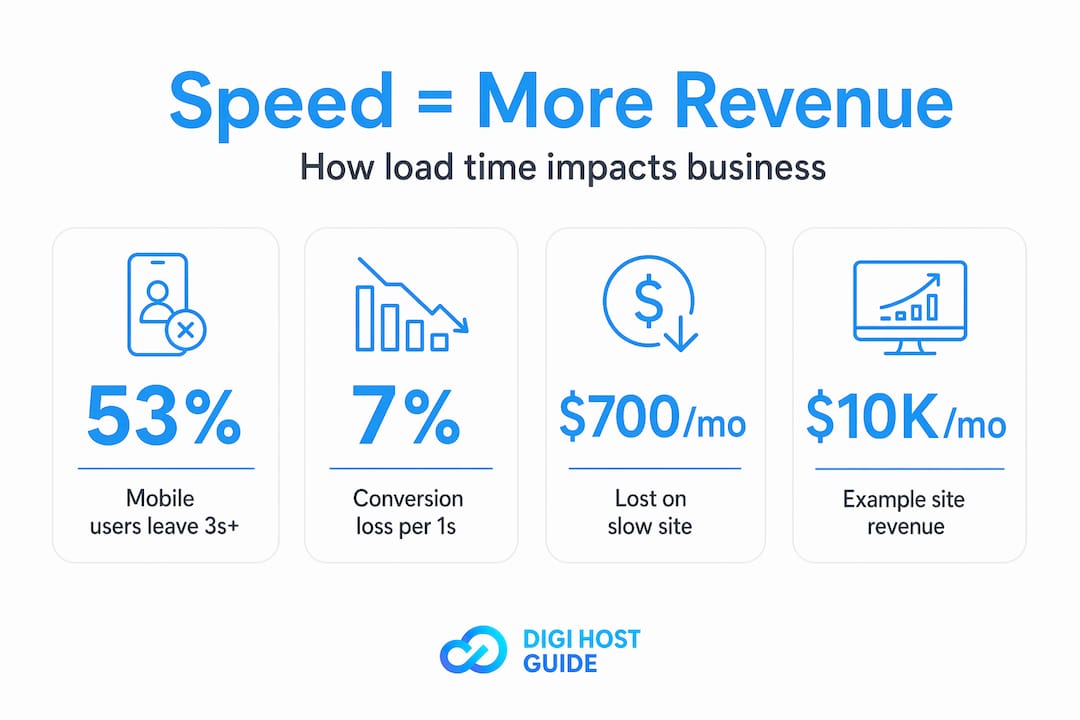
For a small business generating $10,000 per month online, a 7% conversion drop from a slower host could mean losing $700 every single month. That’s $8,400 per year. Now consider that upgrading from a basic shared hosting plan to a performance-focused plan might cost an extra $15 to $30 per month. The math is straightforward.
Here’s a comparison of how low-cost and performance-focused hosting typically stack up in real-world business terms:
| Factor | Budget shared hosting | Performance hosting |
|---|---|---|
| Average TTFB | 600ms to 1,200ms | 100ms to 300ms |
| Monthly cost | $3 to $8 | $15 to $50 |
| CDN included | Rarely | Often |
| Server resources | Shared, limited | Dedicated or scalable |
| Uptime guarantee | 99.9% (often unverified) | 99.9% to 99.99% (verified) |
| Estimated conversion impact | Negative, measurable | Neutral to positive |
Stop Losing Revenue to Slow Server Latency
Cheap shared plans throttle CPU threads when traffic spikes, destroying your conversion rates. Kinsta Managed Hosting runs on Google Cloud’s Premium Tier network with C2/C3D VMs, isolated container tech, and Cloudflare integration to deliver maximum speed for revenue-generating sites.
Pro Tip: Don’t let the $4 per month price tag on a budget plan fool you. When you factor in lost conversions and the time you’ll spend troubleshooting slow load times, choosing a fast host from the start almost always costs less in the long run.
The business case becomes even stronger when you factor in technical SEO and speed. Search visibility is a long-term asset. If slow hosting suppresses your rankings for months, the compounding cost in lost organic traffic is far harder to calculate — but it’s real. Ranking on page two instead of page one for a competitive keyword can mean the difference between a steady stream of leads and none at all.
It’s also worth thinking about reputation. Users have short memories for positive experiences but long ones for frustration. A visitor who bounces from your slow-loading site may not come back, even if you fix the issue later. First impressions are set by server response times, long before your design or content gets a chance to do its job.
Choosing hosting that delivers speed (and what to watch for)
To turn insights into action, here’s what to look for when evaluating hosts and how to avoid common speed-killers.
Speed isn’t just one dial you turn up. It’s a combination of infrastructure decisions that your host makes on your behalf. Edge delivery and caching layers used in modern hosting reduce latency and can materially improve Core Web Vitals scores and overall user experience. When evaluating a host, these are the features that matter most for speed:
- Solid State Drives (SSD) or NVMe storage: Much faster read/write speeds compared to traditional hard drives, reducing the time it takes for your server to load files
- Full-page caching: A system that stores pre-built versions of your pages so the server doesn’t have to rebuild them from scratch on every visit
- CDN integration: A Content Delivery Network distributes copies of your site to servers worldwide, so users always load content from a nearby location
- Edge servers: Similar to CDN, edge servers process requests closer to the user rather than sending all traffic to one central location
- Transparent uptime reporting: Hosts that publish real uptime data give you a clearer picture of their actual reliability
High-Speed Google Cloud Hosting on a Budget
Looking for top-tier speed without enterprise pricing? SiteGround combines Google Cloud Infrastructure, custom Ultrafast PHP, and built-in SuperCacher technology to keep your TTFB low and Core Web Vitals green.
Before you sign up with any host, ask these questions:
- Where are your data centers located, and do you offer CDN or edge delivery?
- What type of storage do your servers use: SSD, NVMe, or HDD?
- Does your plan include full-page caching, or do I need to set that up myself?
- How many websites share the same server on a shared hosting plan?
- Can you show me real-user performance data or uptime logs?
Pro Tip: Don’t rely solely on lab tools like PageSpeed Insights or GTmetrix to evaluate a host. Those tools test a single load from a single location under ideal conditions. Use a tool that captures real-user metrics to check for slow-tail scenarios, the kind Google actually measures when determining your ranking. A thorough speed auditing process should include real-user monitoring.
Watch out for these red flags when comparing hosts:
- Overloaded shared hosting: If a provider advertises “unlimited” everything at very low prices, resources are likely shared heavily across thousands of accounts, which crushes TTFB
- No CDN or edge offering: Any host that doesn’t mention CDN integration is likely routing all traffic through one central server
- Hidden server locations: If a host doesn’t clearly state where their data centers are, it’s worth investigating before you commit
Learning how to choose a web host is the key skill here, and avoiding common hosting mistakes can save you a lot of frustration and lost revenue down the line.
Our perspective: Why hosting speed is your invisible advantage
With the essentials covered, here’s our honest opinion on the real edge hosting speed provides and how most underestimate its value.
Most speed optimization advice focuses on what you can see and control: image compression, JavaScript loading order, font choices. That’s understandable. Those are the variables you manage directly. But hosting speed is different because it operates silently in the background, capping everything else you do. You can spend weeks refining your front end and still lose to a competitor with a faster host. When evaluating why hosting speed matters for your long-term strategy, remember that it forms the untouchable foundation of your user experience.
Instantly Reduce Global Latency with Edge Caching
Can’t migrate your origin host right now? You can still drastically lower your TTFB globally. Bunny.net is a lightning-fast CDN and Edge Storage solution that caches your site across 110+ PoPs worldwide, instantly bypassing server geography constraints.
Here’s the uncomfortable truth: your average TTFB doesn’t tell the real story. What matters is your worst-case TTFB. If your server slows down at peak hours or under traffic spikes, that’s the experience Google captures and the experience that drives people away. Most shared hosting plans are built for normal traffic, not for the moments when it actually counts.
For small businesses and freelancers, there’s actually a meaningful opportunity here. Large companies have engineering teams optimizing for speed at every layer. But the gap between a $5 shared hosting plan and a $30 performance plan is much smaller than the gap between a small business and an enterprise. With the right host, you can deliver a site experience that’s competitive at a global level, without a large technical team behind you.
We believe upgrading your hosting is often the single highest-leverage move you can make for your website. It’s not flashy. It doesn’t require design work or writing. But it raises the floor for everything else you do. Check out our small business hosting guide to see how other businesses approach this decision practically and cost-effectively.
FAQ
Why is hosting speed more important than just optimizing website images?
Even perfectly optimized images can’t compensate if your server is slow, because TTFB is foundational and a slow server creates a delay floor that affects every element on the page regardless of how lean your files are.
Does server location affect website speed?
Yes, hosting your site closer to your users reduces latency and can significantly improve load times and SEO scores, since edge/CDN server proximity reduces the physical distance data must travel on every request.
How does a slow host impact my Google rankings?
Google evaluates Core Web Vitals based on real-user percentiles, so if your hosting creates a slow experience for even a portion of your visitors, your rankings can drop even if your lab-based speed scores look fine.
Can upgrading my hosting really increase my sales or leads?
Faster hosting leads to higher engagement and conversion rates, and since speed improvements have business impact by reducing bounce rates and increasing the likelihood of a completed action, investing in better hosting often translates directly into measurable revenue gains.


