

Last Updated on: 23rd May 2026, 09:11 am
Table of Contents
- How VPS hosting works: the basics explained
- VPS vs shared hosting: what really changes?
- Who should (and shouldn’t) use VPS hosting?
- Common VPS pitfalls: performance and management limitations
- How to pick the right VPS: real-world tips for 2026
- Our take: what most first-time VPS buyers get wrong
- Ready to compare the best VPS and web hosting options?
- Frequently asked questions
Key Takeaways
| Point | Details |
|---|---|
| VPS means guaranteed resources | VPS gives you your own CPU, RAM, and storage, making performance less affected by others on the server. |
| Better isolation | Sites on VPS are less likely to suffer slowdowns or security issues from neighboring accounts. |
| Mind the management | Unmanaged VPS solutions require more technical know-how for maintenance, security, and troubleshooting. |
| Pitfalls of small plans | Low-cost or underpowered VPS options can bottleneck performance if not chosen wisely. |
| Smart shopping is vital | Comparing features, support, and user reviews helps you pick the right VPS for your needs in 2026. |
How VPS hosting works: the basics explained
Let’s start with the fundamentals. VPS hosting works by slicing a physical server into multiple isolated virtual machines using virtualization technology, typically managed by a piece of software called a hypervisor. Think of a hypervisor as a traffic controller that keeps each virtual machine operating independently, even though they all share the same physical hardware underneath.
Each virtual machine, or VPS, gets its own defined allocation of resources. That means your site has a reserved slice of:
- CPU (processing power for running your site’s code and scripts)
- RAM (short-term memory used to handle active requests and processes)
- Storage (disk space where your files, databases, and emails live)
- Bandwidth (the volume of data that can be transferred between your server and visitors)
This separation is what makes VPS fundamentally different from traditional shared hosting. You’re not competing with other websites for the same pool of resources. Your CPU is yours. Your RAM is yours. Other sites on the same physical machine can’t eat into them.
There are many types of web hosting available today, and VPS falls in the middle of the spectrum in terms of both cost and complexity. Here’s a quick look at how the major categories stack up:
| Hosting type | Resources | Isolation | Best for |
|---|---|---|---|
| Shared hosting | Shared pool | None | Starter sites, low traffic |
| VPS hosting | Dedicated allocation | Strong | Growing sites, small businesses |
| Dedicated server | Entire server | Complete | High-traffic, large applications |
| Cloud hosting | Scalable, flexible | Moderate to strong | Variable traffic, enterprise |
Pro Tip: VPS is generally worth considering once your shared hosting plan starts producing slow load times, errors during traffic peaks, or you need software that requires server-level access. If your site is brand new with minimal traffic, shared hosting may still be the right starting point.
VPS vs shared hosting: what really changes?
Having defined what is VPS hosting, it’s helpful to see how it changes the game compared to the cheap shared hosting you might be used to.

The biggest issue with shared hosting is simple: you share everything. Hundreds of websites might live on the same server, and any one of them can consume a burst of CPU or RAM that affects everyone else. This is called the “noisy neighbor” effect. One high-traffic site on your shared server can slow yours to a crawl, even if your own traffic is perfectly normal.
VPS hosting generally provides more predictable performance and isolation, specifically because it mitigates that noisy neighbor problem. Your resources are carved out independently, so what happens on another virtual machine doesn’t affect your site’s performance.
“The difference isn’t just speed — it’s consistency. A site on VPS hosting tends to deliver the same load time at 2 PM as it does at 2 AM, because it isn’t competing for resources on the fly.”
Here’s a side-by-side comparison to make this concrete:
| Feature | Shared hosting | VPS hosting |
|---|---|---|
| Resource guarantees | No | Yes |
| Root server access | No | Yes (on most plans) |
| Isolation from other sites | None | Strong |
| Performance under traffic | Unpredictable | Consistent |
| Price range (monthly) | $2–$10 | $15–$100+ |
| Ideal use case | Blogs, hobby sites | Business sites, growing apps |
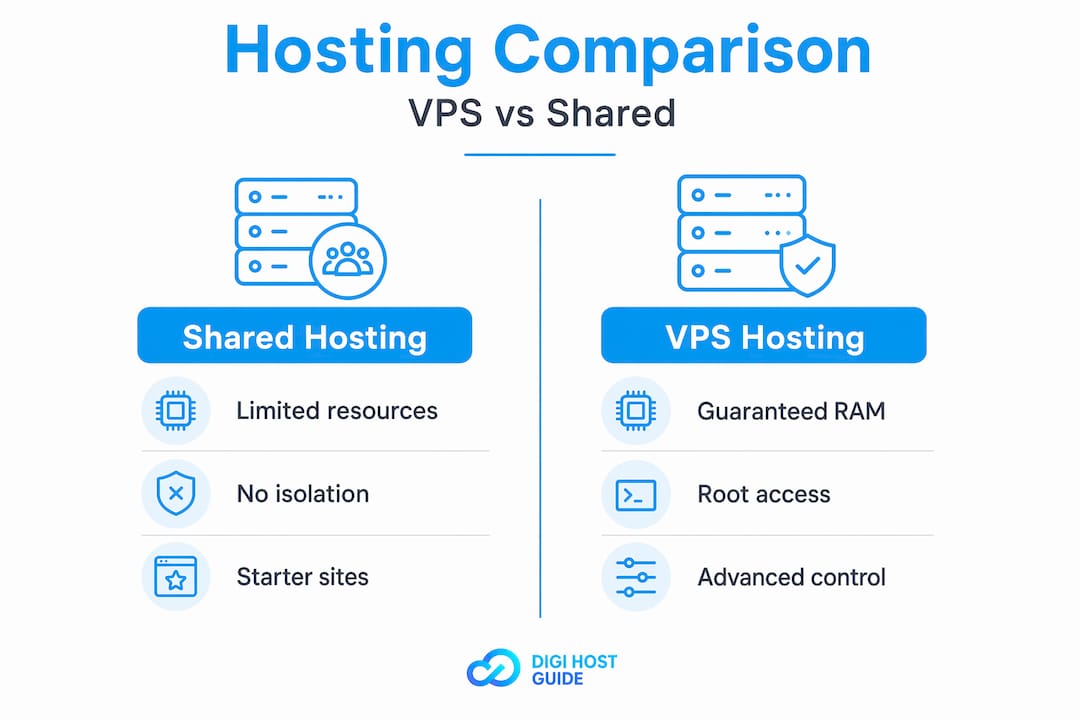
Beyond raw performance, VPS also gives you control. With root access, you can install custom software, configure your server settings, and choose your control panels or security tools. That’s simply not possible on most shared plans.
You should seriously consider switching from shared to VPS hosting if:
- Your site traffic has grown beyond a few thousand visits per month and load times are slipping.
- You run an e-commerce store where downtime or slowness directly costs you sales.
- Your web application requires specific software versions, custom libraries, or server-level configuration.
- You’ve received resource limit warnings or suspensions from your current shared host.
- Security isolation matters to you, for example, if you handle customer data or payments.
Who should (and shouldn’t) use VPS hosting?
Understanding how VPS compares to shared hosting still leaves one big question: is it the right move for you or your business?
If you’ve outgrown shared hosting’s resource variability but aren’t ready for a full dedicated server, VPS is commonly the cost-effective next step, especially when you need root access for server-level tuning or stronger isolation. This is particularly true for small business owners running WooCommerce stores, membership sites, booking platforms, or any app with real user activity.
That said, VPS isn’t for everyone. It requires at least a basic comfort level with server management, or the budget to pay for someone else to handle it.
Here’s a practical breakdown:
Good VPS user profiles:
- A small business running a custom web application or CRM
- An e-commerce store seeing consistent monthly traffic of 5,000+ visitors
- A developer or freelancer hosting multiple client websites
- A blogger or content creator with a growing audience and performance complaints
- Someone running email marketing tools that require custom server configuration
Stick with shared hosting if you:
- Are just launching your first website with no existing traffic
- Have a simple brochure-style site with minimal visitor volume
- Don’t have technical support available and aren’t comfortable troubleshooting server issues
- Are working within a very tight budget and can’t yet justify the cost jump
For small businesses that need reliable email hosting alongside their website, VPS can also help consolidate both under one managed environment, reducing costs and complexity over time.
The technical demands of VPS are real. On an unmanaged plan, you’re responsible for configuring the server, applying security patches, monitoring uptime, and handling backups. If that sounds like too much, consider a managed VPS plan, which means the hosting provider handles most or all of those tasks for you. It costs more, but it removes the steep learning curve. For businesses that want reliable sites without becoming server administrators, managed VPS or managed website needs services are often the smarter path.
Pro Tip: If you’re not sure whether you need VPS yet, ask your current host for a resource usage report. If you’re consistently hitting 80% or more of your CPU or RAM allocation, it’s time to upgrade.
Common VPS pitfalls: performance and management limitations
VPS hosting is powerful, but it’s not a magic bullet. Let’s look at what trips people up when they move to VPS for the first time.
One of the most frustrating surprises for new VPS users is discovering that their plan feels slow. Small or low-spec VPS instances can feel slow due to CPU and RAM pressure, storage I/O wait, throttling, oversubscription, or swapping when memory is exhausted. In plain terms: a low-end VPS plan from a budget provider might actually perform worse than a decent shared hosting plan from a reputable company.
Another major pitfall is misunderstanding what “unmanaged” really means. The more unmanaged your VPS is, the more security, patching, monitoring, backups, and performance tuning become your responsibility. Many buyers discover this only after something goes wrong.
“The biggest VPS mistake we see is treating it like shared hosting — just installing a site and walking away. An unmanaged VPS needs regular attention: updates, security checks, log reviews, and backup verification.”
Watch for these VPS challenges when evaluating or using a VPS plan:
- Oversubscription: Some providers sell more virtual resources than the physical machine can sustain, degrading performance during peak times.
- Slow storage: Older HDD-based VPS plans have significantly slower read/write speeds than NVMe SSD plans. This directly affects database queries and page load times.
- Insufficient RAM on entry plans: Plans with 512MB or 1GB of RAM can run out quickly once you add a CMS, plugins, and database queries. Many WordPress sites need at least 2GB to run comfortably.
- No automatic backups: Unmanaged VPS plans often don’t include backup systems by default. One failed update can wipe your data if you haven’t set up your own backup routine.
- Security gaps: Without regular security audits and OS patches, an unmanaged VPS can become a target for automated attacks. This is especially true for servers running outdated versions of PHP, MySQL, or Apache.
Understanding the high-performance hosting benefits of well-configured VPS helps you set realistic expectations from the start.
How to pick the right VPS: real-world tips for 2026
Equipped with an awareness of potential pitfalls, here’s how to shop for VPS hosting without getting burned in today’s market.
Price and specs on a sales page won’t tell you the full story. Performance benchmarks should be interpreted carefully because results can change with workload shape (steady vs. spiky traffic), storage tier (NVMe vs. HDD), caching and CDN usage, and provider oversubscription policies. A plan that benchmarks well under synthetic testing can still underperform on a real WordPress site with a busy WooCommerce checkout.
For WordPress hosting tips specifically, storage type and PHP version availability matter just as much as raw RAM.
Here are five things to check before you commit to any VPS plan:
- Provider reputation and infrastructure: Look for independent reviews, uptime track records, and data center locations. A well-known provider with solid infrastructure will almost always outperform a budget reseller.
- True resource allocation: Ask specifically whether CPU and RAM are guaranteed or “burstable.” Burstable resources sound appealing but can leave you with poor performance when the physical server is under load.
- Storage type: Prioritize NVMe SSD over standard SSD, and avoid HDD-based VPS plans if performance matters to you.
- Support quality and response time: Even on managed plans, support responsiveness varies widely. Check third-party reviews and test pre-sales response times.
- Scalability options: Can you upgrade your plan without migrating to a new server? The best providers let you scale RAM and CPU on demand with minimal disruption.
Pro Tip: Don’t be fooled by “unlimited bandwidth” claims. In hosting, truly unlimited resources don’t exist. Read the fair-use policy carefully, especially if you expect traffic spikes or large file transfers.
Using hosting reviews from credible comparison sites and checking real user feedback across forums gives you a clearer picture than marketing copy alone. When you’re ready to compare web hosts side by side, zone in on plans that match your actual traffic volume and technical requirements, not just the ones with the most impressive spec sheet.
Our take: what most first-time VPS buyers get wrong
After covering the nuts and bolts, here’s what we’ve learned from years of evaluating VPS deployments and working through hosting decisions with small business owners.
The most common mistake is fixating on price and raw RAM. Buyers compare two plans, see that one offers 4GB of RAM for $5 less per month, and go with the cheaper option. But RAM alone doesn’t tell you how that provider allocates it, whether they oversubscribe their nodes, or what their support looks like when something breaks at midnight.
Provider reputation and honest resource allocation matter far more than an extra gigabyte of RAM. We’ve seen sites on a well-run 2GB VPS consistently outperform sites on a poorly managed 8GB plan. The numbers on the page are just the starting point.
The second mistake is either over-provisioning or under-provisioning. Most small business sites don’t need the resources buyers think they do. A clean WordPress site with reasonable caching can run well on 2GB of RAM and a modern CPU. You don’t need to buy the biggest plan available. What you do need is a reliable provider with honest infrastructure and real support.
The third mistake is the “set and forget” approach. Even on a managed VPS, your site needs ongoing attention. That means regular plugin and CMS updates, security monitoring, and periodic performance checks. Management services reduce your burden but don’t eliminate it entirely. The critical hosting points that actually drive success are less glamorous than picking the right plan: consistent maintenance, monitoring, and knowing when to ask for help.
Start conservatively. Pick a mid-tier plan from a reputable provider, monitor your usage for 60 to 90 days, and scale when the data tells you to. That approach will serve you far better than buying the biggest plan upfront and hoping it solves everything.
Ready to compare the best VPS and web hosting options?
If you’ve worked through this guide and you’re starting to feel clearer about whether VPS hosting fits your situation, the next step is finding a provider that actually delivers on its promises. At DigiHost Guide, we’ve built a library of structured resources to help you do exactly that. Browse our in-depth hosting reviews to see how individual providers perform across key metrics, or use our curated top web hostings list to compare VPS and other plans side by side. If you’re still weighing your options across different hosting types, our guide to web hosting types can help you map out the full picture before you commit.
Frequently asked questions
Is VPS hosting faster than shared hosting?
Generally, VPS hosting offers more predictable and consistent speed than shared hosting, especially under moderate to high loads, because VPS provides more predictable performance and eliminates the noisy neighbor effect found in shared environments.
What is the main benefit of VPS hosting?
The main benefit is having isolated resources and settings, which means fewer slowdowns from other sites and more control for your apps, since each VPS gets its own operating system environment and a defined allocation of resources.
What are some disadvantages of VPS hosting?
On smaller plans, small VPS instances can feel slow due to CPU and RAM pressure, storage I/O wait, or oversubscription, and because the more unmanaged your VPS is, the more security, patching, and monitoring become your responsibility.
What should you check before picking a VPS plan in 2026?
Review provider reputation, resource allocation policies, storage type, customer support quality, and how your traffic patterns align with the plan, since performance benchmarks depend heavily on workload shape, storage tier, caching setup, and provider oversubscription policies.
