

Last Updated on: 1st June 2026, 03:02 pm
TL;DR:
- Shared hosting involves multiple websites sharing a single server’s resources while maintaining isolated environments, making it affordable and suitable for small sites. Its limitations include performance variability and restricted server customization, prompting upgrades when higher stability and control are needed. Choosing the right plan depends on traffic, budget, security, and growth expectations, with thorough provider evaluation recommended for optimal results.
Many people assume that shared hosting means your files sit exposed on a server next to strangers’ websites, or that it’s always slow and insecure. Neither is true. Understanding what is shared hosting clearly, before you sign up for a plan or dismiss it outright, can save you real money and frustration. This guide explains how shared hosting actually works, what it costs you in performance and control, and how to know whether it’s the right fit for your site today and as you grow.
Table of Contents
- What is shared hosting and how it works
- Benefits of shared hosting for small sites
- Limitations compared to VPS and dedicated hosting
- How to decide if shared hosting is right for you
- My honest take on shared hosting
- Find the right hosting plan for your site
- FAQ
What is shared hosting and how it works
Shared hosting is a model where multiple websites occupy the same physical server and draw from the same pool of resources, including CPU processing power, RAM, storage space, and bandwidth. Think of it like renting an apartment in a building. You have your own locked unit with your own furniture, but the building’s plumbing, electricity, and common areas are shared with every other tenant.
The keyword to understand is isolated. Your files, databases, and account settings are kept in a private, contained space within the server. Other users on the same machine cannot browse your files any more than your neighbor can walk through your locked front door. The hosting provider manages the physical server, handles software updates at the system level, and monitors overall server health. You focus on your website.
When you log in to your hosting control panel, you’re interacting with your slice of the server. Most shared hosts give you tools like cPanel or similar dashboards to manage files, set up email accounts, install WordPress, and configure databases. None of this requires any knowledge of server administration. That’s the whole point.
Pro Tip: Before buying a shared hosting plan, check which isolation technology the provider uses. Hosts that deploy CageFS or similar containment systems give your account much stronger protection than basic setups.
Learning how web hosting works at a foundational level helps you ask better questions when comparing plans and providers.
Benefits of shared hosting for small sites
Shared hosting is popular for one clear reason: the cost is genuinely low because the server bill is split across dozens or hundreds of accounts. Typical shared hosting runs from roughly $1.50 to $5 per month, compared to $10 to $20 per month for a basic VPS. For someone launching a portfolio, a local business site, or a personal blog, that gap matters.
Here’s what makes shared hosting a practical starting point for most beginners and small business owners:
- No server management. The provider handles operating system updates, server security patches, and hardware maintenance. You never need to touch any of that.
- Quick setup. Most hosts let you launch a WordPress site in under 15 minutes using one-click installers.
- Bundled features. Plans typically include free SSL certificates, email accounts, and a website builder at no extra charge.
- Low technical barrier. You don’t need to know Linux commands or server configurations. The control panel handles everything visually.
- Managed infrastructure security. The host monitors the server for threats at the infrastructure level, so you’re not starting from zero on protection.
Shared hosting is well suited for personal sites, small business pages, service portfolios, and modest traffic blogs. If your site gets a few hundred to a few thousand visitors per month, shared hosting handles that load without breaking a sweat.
Pro Tip: Don’t buy unlimited storage plans on face value. Read the acceptable use policy. Most providers define “unlimited” with fair-use clauses that cap heavy usage. Match the plan to your actual expected needs.

Limitations compared to VPS and dedicated hosting
Shared hosting is not the right answer for every situation, and understanding the trade-offs is where smart decisions get made. Here is a direct comparison of the three main hosting tiers to put the differences in perspective.
| Feature | Shared Hosting | VPS Hosting | Dedicated Hosting |
|---|---|---|---|
| Monthly cost | $1.50 to $5 | $10 to $20 | $80 and up |
| Server resources | Shared pool | Guaranteed allocation | Full server |
| Root access | No | Yes | Yes |
| Performance consistency | Variable | More predictable | Very consistent |
| Server customization | Very limited | High | Full control |
| Best for | Small sites, blogs | Growing sites, apps | High traffic, enterprise |
The biggest practical limitation is what the industry calls the “noisy neighbor” effect. Performance variability on shared hosting happens because of resource contention from other sites on the server, not anything wrong with your own code. If a neighboring account suddenly gets a traffic spike, your site may load more slowly for a few minutes. You have no control over that.
Shared hosting users also have no root access and cannot change server-wide configurations. That means you cannot install custom software at the system level, modify PHP settings beyond what the control panel allows, or change the server environment to suit a specialized application. For a standard WordPress site or a simple business page, this is rarely a problem. For a custom web application, it can stop you cold.
On security, the picture is nuanced. Containment virtualization like CageFS isolates accounts from each other effectively, but no isolation is perfect, and the security responsibility is split. The provider secures the server infrastructure; you are responsible for keeping your CMS, plugins, and passwords secure. Reviewing essential website security features for your specific setup is worth doing regardless of which host you choose.
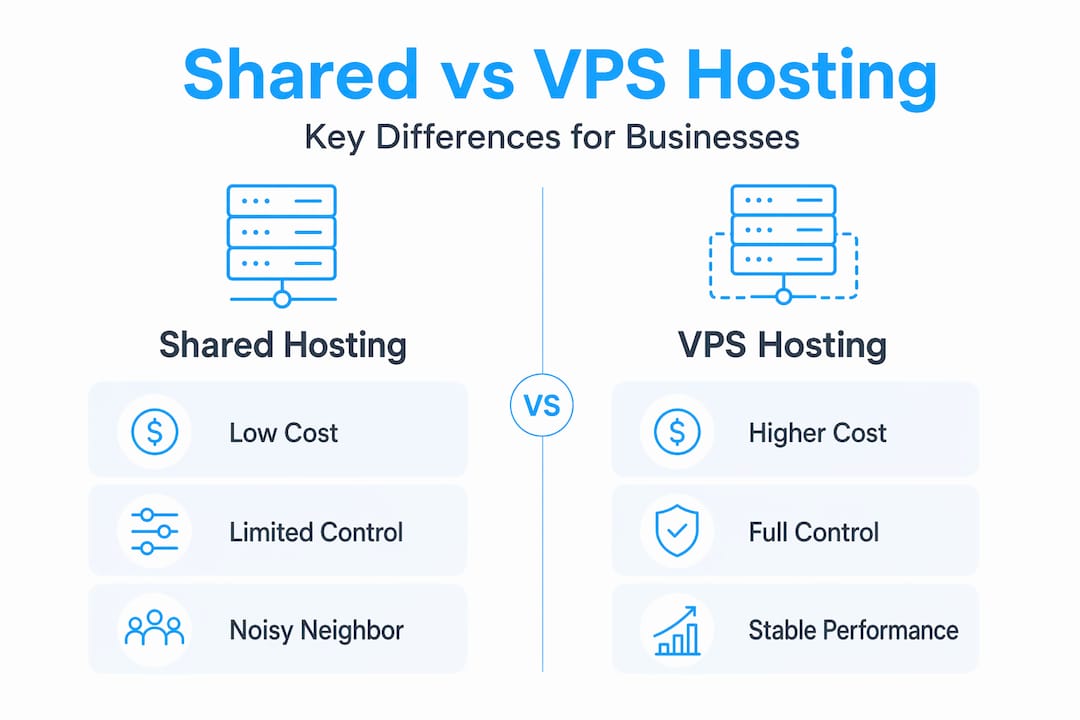
Upgrading to VPS or dedicated hosting makes sense when you need consistent resource availability, root-level customization, or more stable uptime under variable load. Read Digi Host Guide’s breakdown of VPS hosting benefits if you think you’re approaching that threshold.
How to decide if shared hosting is right for you
Choosing between hosting types does not require a technical background. It requires honest answers to a few practical questions. Work through this list before you commit to a plan.
How much traffic do you expect? If your site will realistically see fewer than 10,000 visitors per month in its first year, shared hosting almost certainly covers your needs. If you’re planning a product launch with thousands of concurrent users on day one, start with VPS.
What is your budget? Shared hosting is the most affordable option, period. If cost is a real constraint, start here and plan to upgrade when your revenue supports it.
Do you need custom server software? If your site runs standard WordPress, a website builder, or a common e-commerce platform like WooCommerce, shared hosting works. If you need a specific runtime environment, custom PHP version, or software that requires installation with root privileges, VPS is the minimum you need.
How important is consistent performance? For a brochure site or a blog, occasional slowdowns during peak hours are tolerable. For an e-commerce store where a two-second delay costs sales, performance consistency becomes more critical, and predictable resource allocation pushes you toward VPS.
Are you comfortable managing site security yourself? On any hosting plan, you’re responsible for keeping your site’s software updated and your passwords strong. If that sounds overwhelming, choose a provider with strong managed security features and consider a WordPress-managed hosting option.
What’s your growth plan? Shared hosting is a great starting point, not a permanent decision. Most hosts let you upgrade your plan with a few clicks. Start lean, then upgrade when actual data, traffic numbers, real costs, tell you it’s time. Don’t overpay for resources you don’t use yet.
The small business hosting guide at Digi Host Guide walks through these factors with specific provider recommendations if you want a more guided decision.
My honest take on shared hosting
I’ve seen many of small business owners and bloggers either overpay for hosting they don’t need or, more commonly, write off shared hosting too quickly after reading a few horror stories about slow load times. Here’s what I’ve actually found to be true
Shared hosting is a genuinely solid entry point for most new websites. The problems people encounter are almost always one of two things: they chose a cheap host with poor isolation and overcrowded servers, or they outgrew the plan and didn’t notice until performance became painful. Neither of those is a flaw with shared hosting as a category.
What I tell people is this: the quality gap between shared hosting providers is enormous. A $2/month plan from a provider that packs 2,000 accounts onto one server is a completely different product from a $5/month plan from a host that limits account density and uses CageFS. The label “shared hosting” covers a lot of ground.
The most common mistake I see is treating the upgrade decision as a vanity move. Some site owners move to VPS because they think it sounds more professional, not because they actually need it. That wastes money. Make data-driven decisions. If you’re seeing slowdowns, check your server response times and talk to support before upgrading. You’d be surprised how often a plugin conflict or an unoptimized database query is the real culprit.
And don’t overlook common hosting mistakes that apply regardless of your plan tier. Good hosting hygiene matters more than you might expect.
— Peter
Find the right hosting plan for your site
If you’re ready to move past the theory and start comparing real options, Digi Host Guide has researched for you. The site’s hosting reviews cover the leading shared hosting providers in detail, including performance data, pricing breakdowns, and honest assessments of who each plan actually suits. You won’t find vague summaries here. Each review includes the specifics you need to make a confident call.
Not sure which hosting type fits your project? The types of web hosting services page lays out the full picture, from shared and VPS to dedicated and managed options, so you can place yourself in the right category before spending a dollar. You can also check the top web hosting providers list for a quick-reference ranking updated for 2026. The goal at Digi Host Guide is to give you clear, honest information so you spend your money on the right plan from day one.
FAQ
What is shared hosting in simple terms?
Shared hosting is when multiple websites run on the same physical server and share its resources, like CPU and RAM, while each account remains isolated. It’s the most affordable mainstream hosting option and works well for small to medium websites.
Is shared hosting secure enough for a small business?
Shared hosting can be secure for small business use, but it depends on the provider’s isolation technology and your own practices. Choose a host that uses account-level containment systems, and keep your CMS and plugins updated at all times.
How does shared hosting differ from VPS hosting?
With shared hosting vs VPS, the main differences are resource allocation and control. VPS gives you a guaranteed slice of server resources and root access; shared hosting gives you a portion of a shared pool with no server-level customization.
When should I upgrade from shared hosting?
Consider upgrading when you consistently see slow response times under normal traffic, need custom server software, or require predictable performance for an online store. Rising traffic alone isn’t always the trigger. Sometimes the need for root-level customization is the real driver.
What types of sites work best on shared hosting?
Shared hosting is well suited for personal sites, blogs, portfolios, and small business websites with moderate traffic. It is not ideal for high-traffic e-commerce stores, custom web applications, or sites with strict uptime requirements.
