

Last Updated on: 13th July 2026, 11:22 am
TL;DR:
- RAID combines multiple drives into one logical unit to enhance performance and reliability. It includes techniques like striping, mirroring, and parity, each offering different trade-offs. RAID improves uptime but is not a substitute for comprehensive backups or data protection strategies.
f you are wondering what is RAID, it stands for Redundant Array of Independent Disks and refers to a data storage method that combines multiple physical hard drives or SSDs into a single logical unit to improve performance, reliability, or both. The Storage Networking Industry Association (SNIA) standardizes RAID levels and data formats under the Common RAID Disk Drive Format (DDF), ensuring hardware interoperability across vendors. Three core techniques define how RAID works: striping (RAID 0), mirroring (RAID 1), and parity (RAID 5 and RAID 6). Each technique makes a different trade-off between raw speed, usable storage capacity, and fault tolerance. Whether you manage a home server, a business database, or a web hosting environment, understanding these trade-offs is the foundation of every smart storage decision.
What is RAID and how does it work?
RAID is a data storage virtualization technology. It takes multiple physical drives and presents them to an operating system as one unified storage device. The underlying technique determines what you gain and what you give up.

Striping (RAID 0) splits data across all drives in the array simultaneously. Every drive works in parallel, so read and write speeds multiply. The catch is that there is zero fault tolerance. Lose one drive and you lose everything. RAID 0 delivers 100% usable capacity across all drives, making it the most storage-efficient option, but it is only appropriate when speed matters more than safety.
Mirroring (RAID 1) writes identical data to two drives at the same time. If one drive fails, the other keeps running without interruption. The trade-off is storage efficiency: RAID 1 uses 50% of total capacity because every byte is written twice. For boot drives and critical system volumes, that cost is worth it.
Parity (RAID 5 and RAID 6) is the middle ground. Instead of duplicating entire drives, parity RAID calculates a checksum and distributes it across the array. RAID 5 can survive one drive failure; RAID 6 uses dual parity and can survive two simultaneous failures. Capacity formulas make this concrete:
| RAID Level | Usable Capacity Formula | Drive Failures Tolerated |
|---|---|---|
| RAID 0 | n × drive size | 0 |
| RAID 1 | 1 × drive size | 1 (of 2) |
| RAID 5 | (n − 1) × drive size | 1 |
| RAID 6 | (n − 2) × drive size | 2 |
| RAID 10 | (n ÷ 2) × drive size | 1 per mirrored pair |
Nested RAID (RAID 10) combines striping and mirroring. You get the speed of RAID 0 and the redundancy of RAID 1. It requires a minimum of four drives and uses half your total capacity, but it is the configuration most storage engineers reach for when both speed and safety matter.
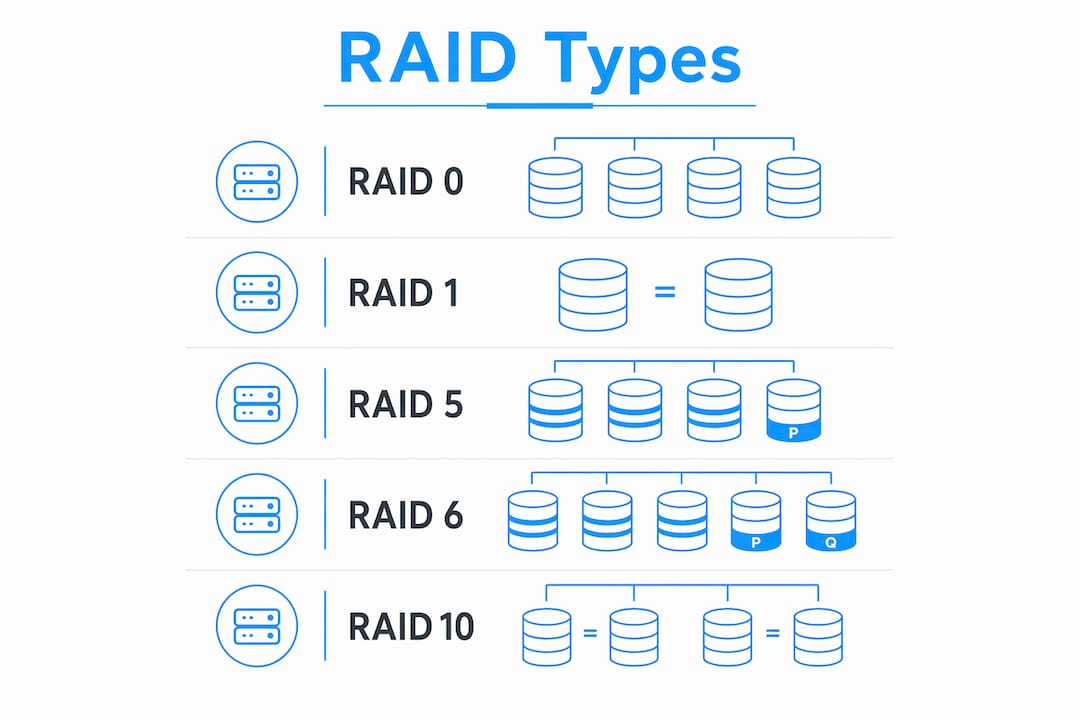
Pro Tip: RAID numerical labels are not a hierarchy. RAID 6 is not “better than” RAID 5 in every situation. Each level solves a specific problem. Match the level to your workload, not to a ranking.
What are the advantages and limitations of RAID?
RAID improves uptime and read performance, but it is not a backup system. This distinction matters more than almost anything else in storage planning.
The core benefit of RAID is high availability. When a drive fails in a redundant array, the system keeps running. For a web server or database, that means no downtime during a hardware replacement. RAID also improves read speeds in most configurations because data can be read from multiple drives simultaneously.
The limitations are real and often underestimated:
- Write penalties in parity RAID. Every write operation in RAID 5 requires four I/O operations: read old data, read old parity, write new data, write new parity. RAID 5 carries a 4x write penalty; RAID 6 carries a 6x penalty. That latency adds up fast in write-heavy environments.
- Rebuild risk with large drives. When a drive fails, the array rebuilds by reading every remaining drive. On large-capacity HDDs, that process can take days. Long rebuild times increase the statistical chance of a second drive failure, which would destroy a RAID 5 array entirely.
- RAID does not protect against everything. A ransomware attack encrypts all drives in the array simultaneously. Accidental file deletion propagates instantly. RAID protects against hardware failure only; data loss from corruption, deletion, or malware requires separate backup solutions.
“RAID is a high availability strategy, not a data protection strategy. Treating it as a backup is one of the most common and costly mistakes in storage management.”
Pro Tip: Follow the 3-2-1 backup rule alongside any RAID setup: three copies of your data, on two different media types, with one copy stored offsite or in the cloud.
How to choose the right RAID configuration for different use cases
Choosing a RAID level comes down to four factors: workload type, acceptable storage overhead, fault tolerance requirements, and drive capacity. Here is a practical decision framework.
Boot drives and simple redundancy. Use RAID 1. It is straightforward, requires only two drives, and keeps a system running if one drive dies. Most servers and NAS devices support RAID 1 natively with no special controller needed.
Databases and write-heavy virtual machines. Use RAID 10. RAID 10 incurs only a 2x write penalty, compared to 4x for RAID 5 and 6x for RAID 6. High-transaction environments like MySQL or PostgreSQL databases see measurable performance gains from this difference.
Large-capacity HDD storage pools. Use RAID 6 or RAID 60. The dual-parity protection covers the extended rebuild window that comes with large drives. RAID 60 combines two RAID 6 groups with striping for additional throughput.
Pure speed with no redundancy needed. Use RAID 0 for scratch disks, video editing workspaces, or temporary processing environments where data can be regenerated or is already backed up elsewhere.
Software-defined storage with integrity checking. Use ZFS with RAIDZ2. ZFS includes end-to-end checksums and self-healing that detect and correct silent data corruption that hardware RAID controllers miss entirely.
| Use Case | Recommended RAID | Minimum Drives | Key Reason |
|---|---|---|---|
| Boot / OS drive | RAID 1 | 2 | Simple redundancy, low cost |
| Database / VM | RAID 10 | 4 | Low write penalty |
| Large HDD pool | RAID 6 | 4 | Dual-parity rebuild safety |
| Media / scratch | RAID 0 | 2 | Maximum speed, no overhead |
| High-integrity storage | ZFS RAIDZ2 | 4 | Checksum and self-healing |
One factor many readers overlook is the controller. Hardware RAID controllers offload processing from the CPU and include a battery-backed cache that protects writes during power loss. Software RAID relies on the host CPU and is more flexible but can introduce overhead on busy systems. For most small business and home lab setups, software RAID or a quality NAS with onboard RAID is sufficient. Enterprise environments with heavy I/O workloads benefit from dedicated hardware controllers.
What are modern RAID standards and future considerations?
The SNIA Common RAID Disk Drive Format standardizes how RAID arrays store metadata and identify themselves to controllers. This standard ensures that an array built on one vendor’s hardware can be recognized and managed by another vendor’s tools, which matters when you replace a failed controller mid-deployment.
Software-defined RAID has moved from niche to mainstream. ZFS, originally developed at Sun Microsystems, is now widely used in enterprise NAS systems, FreeBSD environments, and Linux through OpenZFS. Its end-to-end checksums and self-healing address a real gap in traditional hardware RAID: bit rot. Bit rot is the gradual corruption of data on disk that hardware RAID controllers cannot detect because they do not verify data integrity at the block level.
The trend for 2026 and beyond points toward several shifts:
- Larger drives, longer rebuild times. As HDD capacities push past 20TB, RAID 5 becomes increasingly risky. Storage architects are moving toward RAID 6, RAIDZ2, or erasure coding for large pools.
- NVMe and all-flash arrays. Traditional RAID was designed around spinning disks. NVMe SSDs have different failure modes and latency profiles. Many all-flash arrays use proprietary erasure coding rather than standard RAID levels.
- Erasure coding in distributed storage. Systems like Ceph and object storage platforms use erasure coding, which is conceptually similar to parity RAID but operates across nodes rather than drives. This approach scales better than traditional RAID for large data centers.
Pro Tip: If you are building a new storage system with drives larger than 8TB, skip RAID 5 entirely. The rebuild risk is not theoretical. Start with RAID 6 or RAIDZ2 as your baseline.
Why RAID is more nuanced than most guides admit
I have seen RAID described as a solved problem, a simple checkbox in a server build. That framing causes real damage. The technology works exactly as designed, but the design does not cover everything people assume it does.
The most common mistake I encounter is treating RAID as equivalent to a backup. A mirrored array is not a backup. If a user deletes a critical database table, that deletion replicates to the mirror within milliseconds. If ransomware encrypts the primary drive, the mirror follows. RAID keeps you running through hardware failure. Nothing more.
The second mistake is choosing a RAID level based on familiarity rather than workload. RAID 5 became the default for years because it balanced capacity and redundancy well for the drive sizes of that era. With modern high-capacity drives, that calculus has changed. A RAID 5 rebuild on a 16TB drive can take 30 or more hours, and every hour of that rebuild is a window where a second failure ends the array.
My practical recommendation: pair any RAID setup with at least one offsite or cloud backup, test your rebuild process before you need it in production, and revisit your RAID level choice every time you upgrade drive capacity. The right answer in 2020 may not be the right answer in 2026.
— Stefan
FAQ
What does RAID stand for?
RAID stands for Redundant Array of Independent Disks. It is a technology that combines multiple physical drives into one logical storage unit to improve performance, redundancy, or both.
Is RAID a replacement for backups?
No. RAID protects against hardware failure only and cannot protect against accidental deletion, file corruption, or ransomware. A separate backup strategy is always required alongside any RAID configuration.
What is the difference between RAID 5 and RAID 6?
RAID 5 uses single parity and can survive one drive failure; RAID 6 uses dual parity and can survive two simultaneous failures. RAID 6 is the safer choice for large-capacity HDD pools where rebuild times are long.
Which RAID level is best for a database server?
RAID 10 is the best choice for database servers and write-heavy applications. It carries only a 2x write penalty compared to the 4x penalty of RAID 5, which translates to lower latency under heavy transaction loads.
Can RAID work with SSDs?
Yes. RAID works with SSDs, including NVMe drives. However, all-flash arrays often use proprietary erasure coding rather than traditional RAID levels, since NVMe drives have different failure profiles and latency characteristics than spinning HDDs.

