

Last Updated on: 20th May 2026, 08:19 pm
Many website owners sign up for a hosting plan without fully understanding what is bandwidth in web hosting, and that gap in knowledge can cost real money. You might assume “unlimited bandwidth” means exactly that, or you might not realize your bandwidth limit is what’s silently slowing your site down during a busy week. Both mistakes are common and both are avoidable. This guide breaks down the definition of bandwidth, how it differs from related terms like data transfer and speed, how to calculate what you actually need, and what steps to take to keep your site running smoothly without unexpected fees.
Table of Contents
- Understanding bandwidth in web hosting
- How unlimited bandwidth really works
- Calculating and estimating your bandwidth needs
- What happens when you exceed bandwidth limits?
- Best practices to optimize your website’s bandwidth usage
- Why understanding bandwidth is more critical than ever for small website owners
- Frequently asked questions
Key Takeaways
| Point | Details |
|---|---|
| Bandwidth definition | Bandwidth is the total amount of data your website can transfer to visitors in a given time period, typically measured monthly. |
| Unlimited bandwidth limits | Unlimited bandwidth plans often have fair-use restrictions and are not limitless under heavy traffic conditions. |
| Calculate needs | Multiply average page size by monthly visits plus downloads, then add a safety margin to estimate bandwidth requirements. |
| Exceeding limits | Going over bandwidth limits can result in slower site performance, suspensions, or extra charges from your host. |
| Optimization tips | Use caching, image compression, and CDNs to reduce bandwidth use and improve load speeds. |
Understanding bandwidth in web hosting
Bandwidth, in the context of web hosting, is the total amount of data your website can transfer to visitors over a set period, usually one month. Think of it as a capacity limit. Every time someone visits your site, their browser downloads files: your HTML, CSS, images, videos, and scripts. All of that counts toward your bandwidth usage.
Bandwidth in web hosting is typically advertised in gigabytes (GB) or terabytes (TB) per month, and exceeding that limit can lead to degraded performance, site suspension, or overage charges depending on your provider. This is why knowing your allowance before choosing a plan matters more than most beginners expect.
Two terms that often get mixed up are bandwidth and data transfer. They sound interchangeable but they are not. Bandwidth is the capacity — how much data can move — while data transfer is the actual amount sent during a billing period. Your bandwidth is the ceiling. Data transfer is how close you are to hitting it.

A third term worth separating is internet speed. Speed measures the rate of transfer at any given second, expressed in megabits per second (Mbps). Bandwidth is about total volume over time, not how fast data moves in a single moment. Understanding how web hosting works at a foundational level helps these distinctions click into place.
Here is a quick summary of the key terms:
- Bandwidth: The maximum data your site is allowed to transfer per month
- Data transfer: The actual data your site has sent during a billing period
- Internet speed: The rate at which data moves at a given moment (Mbps)
- Overage: What happens when your data transfer exceeds your bandwidth limit
How unlimited bandwidth really works
Fair-use policies during traffic spikes are how providers manage shared server resources. When one account consumes too much, it affects everyone else on that server. Unlimited plans simply mean the provider is not going to count gigabytes against you in a straightforward way. It does not mean you have a free pass to run a high-traffic video streaming site on a $3/month plan.
What this means for you practically:
- Fair-use clauses are written into almost every unlimited hosting agreement
- Port speed limits cap how much data can flow at once regardless of the monthly cap
- Traffic spikes from a viral post or product launch can still trigger throttling
- Shared hosting environments are especially vulnerable to resource contention
- Reading the terms of service before signing up is not optional if you run a business
Pro Tip: When evaluating a plan that advertises unlimited bandwidth, go directly to the provider’s terms of service and search for “fair use” or “acceptable use policy.” That section will tell you what the real limits are.
Calculating and estimating your bandwidth needs
Understanding how bandwidth affects websites is one thing. Knowing how much you actually need is where the knowledge becomes actionable. The good news is that bandwidth requirements can be estimated with a straightforward calculation based on your page size and monthly traffic.
Here is how to calculate bandwidth in four steps:
- Find your average page size. Use a tool like Google PageSpeed Insights or GTmetrix to measure how many megabytes a typical page on your site transfers.
- Estimate your monthly pageviews. Check your analytics dashboard or use a tool for analyzing website traffic to get a realistic monthly number.
- Multiply and add media. Multiply average page size (in MB) by monthly pageviews, then add any bandwidth from file downloads or video streams.
- Apply a safety margin. Increase your total by 20 to 30 percent to account for growth and traffic spikes.
Here is what that looks like in practice:
| Variable | Example value |
|---|---|
| Average page size | 2 MB |
| Monthly pageviews | 10,000 |
| Base bandwidth | 20,000 MB (20 GB) |
| Downloads/media | 5 GB |
| Subtotal | 25 GB |
| Safety margin (25%) | 6.25 GB |
| Total estimated need | ~31.25 GB/month |
This is also not just a theoretical exercise. Bandwidth is metered and billed by real infrastructure providers, and you can track actual usage in your hosting dashboard or invoices. Comparing your estimate against real usage over time is how you stay ahead of problems.
Pro Tip: If you are launching a new marketing campaign or expecting a traffic spike from a product release, recalculate your bandwidth estimate before the event. That one habit has saved many small business owners from an embarrassing outage at exactly the wrong moment.
Understanding your actual needs also helps when choosing a web host, since you can match the plan to your real requirements rather than guessing. It also protects your search rankings, because web hosting impacts SEO directly through site speed and uptime.
What happens when you exceed bandwidth limits?
Now you know how to estimate your needs. But what if your site grows faster than expected, or a campaign goes viral? The consequences of exceeding your limit are real and worth preparing for.
When a website exceeds its bandwidth, the hosting provider typically takes one of three actions: throttle your connection speed, temporarily suspend your site, or apply overage charges to your next invoice. None of those outcomes are good, especially if it happens mid-launch or during peak sales season.
“The real risk isn’t only how much traffic you expect, but how your traffic pattern behaves around peaks like launches and campaigns.” This framing shifts bandwidth planning from a monthly average exercise to a peak demand exercise. Plan for your best day, not your average day.
Common causes of bandwidth overages include:
- Large unoptimized media files that force full downloads on every visit
- Traffic spikes from social media shares, press coverage, or ad campaigns
- Bots and scrapers that crawl your site repeatedly and consume data without bringing real visitors
- Misconfigured caching that forces repeated full-page downloads instead of serving cached versions
- Streaming or large file downloads hosted directly on your server
You can monitor your bandwidth usage through your hosting control panel, usually under a section labeled “Statistics” or “Bandwidth Usage.” Most panels update daily. Avoiding common hosting mistakes like ignoring these dashboards is one of the easiest ways to stay out of trouble. Also, your server’s geographic location affects how efficiently data is delivered, which influences how fast you consume bandwidth under load.
Pro Tip: Set up an email alert in your hosting dashboard if your provider offers one. Many do. Getting a warning at 75% or 80% of your monthly limit gives you time to act before your site goes down.
Best practices to optimize your website’s bandwidth usage
Reducing how much bandwidth your site consumes is not just about avoiding overages. It directly improves page load speed, user experience, and your search engine rankings. These practices are practical and most can be implemented without touching a line of code.
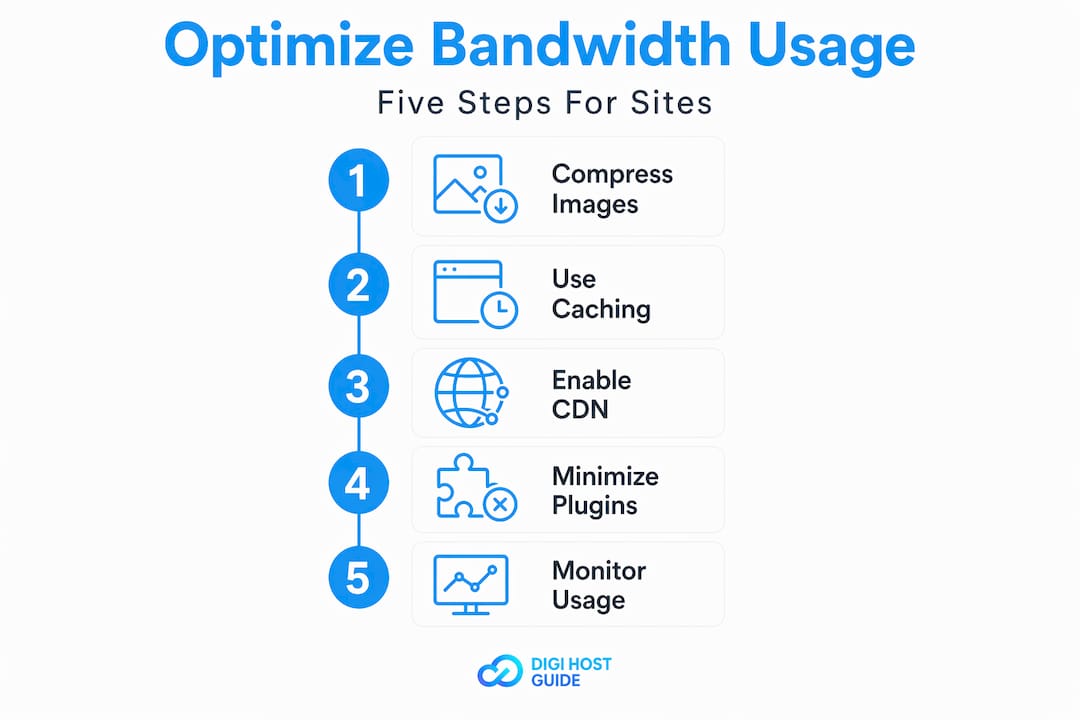
Offloading static and media content to a content delivery network (CDN) is the single most effective move for bandwidth reduction. A CDN stores copies of your files on servers around the world and serves them from the location closest to each visitor. Your origin server handles far less data transfer as a result.
Key optimization practices to adopt:
- Compress images before uploading. Tools like Squoosh or TinyPNG can cut image file sizes by 60 to 80 percent without visible quality loss.
- Enable browser caching. When a visitor’s browser saves static files locally, their return visits consume almost no bandwidth from your server.
- Use a CDN to serve images, CSS, JavaScript, and video from distributed edge servers rather than your host.
- Configure caching headers correctly. Incorrect headers can force browsers to re-download files on every visit even when nothing has changed.
- Lazy-load images and videos. This delays loading media until a visitor actually scrolls to it, reducing wasted data transfer on pages users never scroll through.
Higher available bandwidth allows more data to be delivered at once, which matters most during traffic spikes. But reducing unnecessary consumption gives you more headroom within any given limit. Both things work together.
You can also use caching plugins if your site runs on a CMS. Most caching plugins handle browser caching, compression, and sometimes CDN integration from a single settings panel.
Pro Tip: After enabling a CDN, check your hosting bandwidth usage the following month. Most site owners see a 40 to 60 percent reduction in origin server data transfer. That figure alone often justifies the cost of a CDN service.
When you are evaluating web hosting bandwidth options, look for providers that are transparent about their limits, throttling policies, and CDN compatibility. Pair that with understanding how hosting affects your SEO rankings and you are making decisions from a genuinely informed position.
Why understanding bandwidth is more critical than ever for small website owners
Here is something that rarely gets said plainly: most small business owners treat bandwidth as a hosting company’s problem until it becomes their problem. That reactive approach is exactly what leads to a site going dark during a product launch or a surprise invoice showing up in the inbox.
The distinction between bandwidth capacity and actual data transfer is not just technical vocabulary. Thinking of bandwidth as “how much can move” and data transfer as “how much actually moved” gives you a mental model for growth planning. When you know your current usage is at 60 percent of your cap, you understand you have room to grow before upgrading. When you are at 90 percent, you know an upgrade is overdue.
The other thing worth saying directly: the websites that struggle most with bandwidth are not the ones with constant high traffic. They are the ones that grow in sudden bursts because of a press mention, a social media moment, or a seasonal sale. Those spikes are where unprepared site owners get hurt. Planning for those peaks, and choosing a hosting plan that fits real requirements, is a straightforward competitive advantage.
In 2026, where a slow or down site loses visitors in seconds and search engines penalize poor performance, bandwidth planning is not optional for anyone who takes their online presence seriously. It is one of those foundational decisions that pays off quietly every day when nothing goes wrong.
Frequently asked questions
What is the difference between bandwidth and data transfer in web hosting?
Bandwidth is the capacity or maximum rate at which data can move, while data transfer is the actual total data your site sends during a billing period like a month. Your bandwidth sets the ceiling; data transfer tracks how close you are to it.
Is unlimited bandwidth truly unlimited on web hosting plans?
No. Unlimited bandwidth means no fixed monthly cap, but usage is still governed by port speed limits and fair-use policies, which means heavy or sustained traffic can still result in throttling or temporary suspension.
How can I calculate how much bandwidth my website needs?
Multiply your average page size (in MB) by your monthly pageviews, add any bandwidth from downloads or media, then apply a safety margin of 20 to 30 percent to account for traffic spikes and growth.
What happens if my website exceeds its bandwidth limit?
Exceeding your bandwidth limit typically leads to your host throttling your site’s speed, suspending access temporarily, or charging overage fees, all of which can damage user experience and revenue.
How can I reduce my website’s bandwidth usage?
Compress images and videos, enable browser caching, and offload media to a CDN so static files are served from edge servers rather than your origin host, reducing the data your server has to transfer directly.
