

Last Updated on: 7th June 2026, 07:55 pm
TL;DR:
- Choosing between cPanel and Plesk depends on your operating system, technical needs, and budget considerations. cPanel is Linux-only with a familiar interface and extensive community support, making it ideal for beginners on shared hosting, while Plesk supports both Linux and Windows and offers advanced developer tools. For small WordPress sites and novice users, cPanel is more accessible, but Plesk provides superior native WordPress management and modern workflows for experienced developers or agencies managing multiple sites.
cPanel and Plesk are the two most widely used web hosting control panels in the world, and choosing between them is one of the first real decisions you face when setting up a website or managing a server. The question of cPanel or Plesk which is better does not have a single answer. It depends on your operating system, your technical background, and what you actually need to do day-to-day. This guide breaks down the key differences in usability, features, pricing, and platform compatibility so you can make a confident, informed choice.
What are the main differences between cPanel and Plesk?
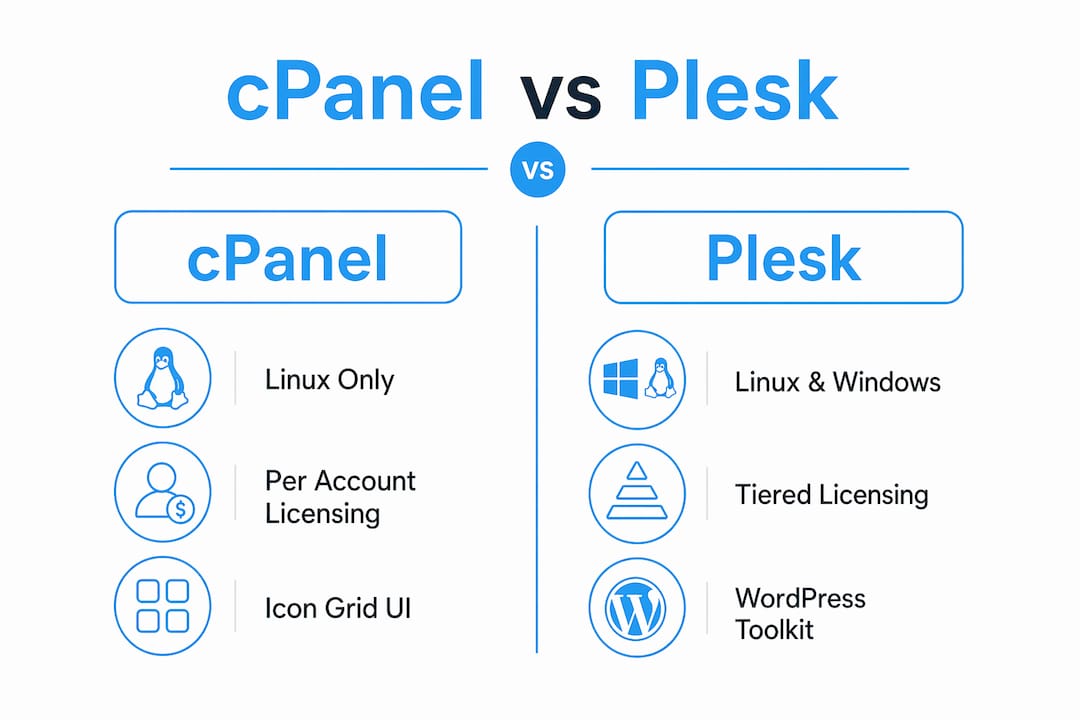
The most fundamental difference is operating system support. cPanel runs on Linux only, while Plesk supports both Linux and Windows Server environments. That single fact eliminates one option for anyone running a Windows-based hosting setup, such as sites built on ASP.NET or using Microsoft SQL Server.
Beyond platform compatibility, the two panels take very different approaches to licensing. cPanel switched to per-account pricing in 2019, which raised costs significantly for hosting providers managing large numbers of accounts. Plesk uses tiered edition pricing, which often works out cheaper for smaller VPS users managing a handful of domains. If you are a small business owner running one or two sites on a VPS, Plesk’s pricing model can be noticeably more affordable.
The user interface tells a different story depending on your background. cPanel uses a traditional icon-grid layout that many shared hosting users have grown up with. Plesk takes a modern sidebar navigation approach, closer to a web app than a server tool. Managing multiple domains feels more organized in Plesk because of this layout. cPanel’s interface, while familiar, can feel cluttered when you are juggling several sites at once.
Community support and documentation also differ considerably. cPanel has a larger community and a deeper pool of tutorials, forum threads, and third-party guides. This matters most when something breaks at 11pm and you need a quick answer. Plesk’s documentation is solid, but the sheer volume of cPanel resources available online gives it an edge for troubleshooting common issues.
Here is a side-by-side comparison of the core differences:
| Feature | cPanel | Plesk |
|---|---|---|
| OS support | Linux only | Linux and Windows |
| Licensing model | Per account | Tiered editions |
| Interface style | Icon grid | Sidebar navigation |
| Community size | Very large | Moderate |
| Windows hosting | Not supported | Fully supported |
| Multi-domain management | Functional | More intuitive |
cPanel or Plesk for beginners: Which is easier to learn?
For someone setting up their first website, the learning curve matters more than advanced features. Both panels handle the basics well, including domain setup, email accounts, file management, and SSL certificates. The difference is in how quickly you can find what you need.

cPanel’s icon-based dashboard is immediately recognizable if you have used shared hosting before. Most beginner tutorials on YouTube, Reddit, and hosting forums are written with cPanel in mind, which means help is easy to find. Plesk’s interface looks cleaner and more modern, but the sidebar layout can feel unfamiliar at first if you are used to the traditional grid. ” If you want to see exactly how to navigate these dashboards to tweak your server, read our comprehensive ‘Manage hosting settings tutorial for website owners.”
Pro Tip: If your hosting provider gives you a choice between cPanel and Plesk and you are a complete beginner, go with cPanel. The volume of beginner-friendly tutorials alone makes the learning process significantly faster.
Here is how the two panels compare specifically for beginner tasks:
| Task | cPanel experience | Plesk experience |
|---|---|---|
| Adding a domain | Simple, well-documented | Clean interface, slightly different flow |
| Setting up email | Straightforward | Equally straightforward |
| Installing WordPress | One-click via Softaculous | One-click via WordPress Toolkit |
| SSL certificate setup | AutoSSL built in | Built-in SSL management |
| File manager | Functional, familiar | Modern, slightly more polished |
| Backup setup | Available, manual steps | More guided workflow |
One area where Plesk genuinely pulls ahead for beginners is WordPress management. Plesk’s WordPress Toolkit includes native staging, cloning, and automated security hardening. In cPanel, those same features typically require separate paid plugins like WP Staging or Solid Security. For a small business owner running a WordPress site, that built-in toolkit removes a real layer of complexity.
The honest answer for beginners is that cPanel wins on familiarity and community support, while Plesk wins on modern design and WordPress-specific tools. If you are starting fresh with no prior experience, either panel works. If you are managing a WordPress site and want less setup friction, Plesk has a practical edge.
How features differ: developer tools, WordPress, and security
Once you move past the basics, the feature gap between cPanel and Plesk becomes more pronounced. Plesk is built with modern development workflows in mind. Plesk supports Git, Docker, and Node.js natively, including multiple Node.js versions per domain. cPanel does not offer these tools out of the box, which means developers working with containerized apps or JavaScript-heavy stacks will find Plesk far more practical.
cPanel’s strength lies in its plugin ecosystem and its companion tool WHM (WebHost Manager). WHM gives resellers and hosting providers granular control over server-level settings, account creation, and resource allocation. This combination of cPanel and WHM is the standard setup for Linux shared hosting providers, and it is deeply familiar to anyone who has worked in that environment.
On the WordPress front, the gap is significant. Plesk’s WordPress Toolkit provides one-click staging environments, automated rollback, and bulk security hardening across multiple sites. These are not minor conveniences. For an agency or freelancer managing ten client WordPress sites, the ability to push updates to staging, test them, and roll back if something breaks saves hours of work each month.
Pro Tip: If you manage more than three WordPress sites, Plesk’s WordPress Toolkit alone justifies the switch. The native staging feature prevents the kind of live-site disasters that cost small businesses real money.
Security tools also differ in approach. Plesk includes ModSecurity and Fail2Ban configuration directly in the interface. cPanel offers similar protection but often requires more manual configuration or third-party add-ons depending on your hosting provider. Neither panel is inherently more secure, but Plesk makes security management more accessible to non-technical users.
Backup and restore capabilities are comparable between the two, though Plesk’s guided backup workflow is slightly more intuitive for users who are not comfortable with command-line tools. cPanel’s backup system is reliable and well-documented, but the process involves more steps.
When to choose cPanel or Plesk based on your hosting setup
The right panel depends heavily on your specific situation. Here are the most common scenarios and which panel fits each one best:
Scenario 1: You are on shared Linux hosting.
cPanel is the standard. Most shared hosting providers, including Bluehost, HostGator, and SiteGround, use cPanel by default. You will have more provider options and more community support.
Scenario 2: You need Windows hosting.
Plesk is your only real option between the two. cPanel does not support Windows at all, so if your application requires IIS, ASP.NET, or MSSQL, Plesk is the correct choice. You can learn more about choosing the right hosting type to understand how this fits into your broader setup.
Scenario 3: You are a reseller or hosting provider.
cPanel with WHM is the industry standard for reseller hosting. The per-account pricing model is a consideration, but the ecosystem and tooling are unmatched for this use case.
Scenario 4: You are an agency managing multiple WordPress sites.
Plesk’s WordPress Toolkit makes this scenario significantly more manageable. Native staging, cloning, and bulk updates reduce the time spent on routine maintenance. WordPress development agencies consistently favor Plesk for this reason, as outlined in agency-focused WordPress workflows.
Scenario 5: You are a developer working with modern stacks.
Plesk’s native support for Git, Docker, and Node.js makes it the better fit. cPanel requires workarounds or server-level configuration to achieve the same results.
Scenario 6: You are a small business owner on a tight budget with a single site.
Either panel works. If your host offers cPanel, stick with it. If they offer Plesk at a lower price point on a VPS plan, that per-server pricing model may save you money over time.
One nuance worth noting: experts recommend choosing the panel that aligns with your existing team’s skills. Retraining staff or relearning workflows negates any feature advantage the other panel might offer. If your team knows cPanel, switching to Plesk for marginal feature gains rarely makes sense unless the workflow difference is substantial.
For budget-conscious users or highly technical operators, it is also worth knowing that alternatives like DirectAdmin or Virtualmin exist and may offer lower overhead with fewer features. They are not right for everyone, but they are worth considering if neither cPanel nor Plesk fits your needs cleanly.
My take: Why do so many people choose the wrong hosting control panel?
The most common mistake I see is people choosing a control panel based on a feature list rather than their actual workflow. Someone reads that Plesk has Git integration and Docker support, switches from cPanel, and then spends three weeks relearning where everything is. Meanwhile, their sites are neglected and their productivity drops. The feature they switched for? They use it twice a month.
cPanel is trusted and battle-tested for a reason. It has been the backbone of shared Linux hosting for decades, and the community around it is genuinely useful when things go wrong. If you are running a small business site on Linux shared hosting and you already know cPanel, there is no compelling reason to switch.
Plesk, on the other hand, is the right tool when your needs genuinely outgrow what cPanel offers. If you are managing WordPress sites for clients, running a Windows server, or building apps with Node.js and Docker, Plesk earns its place. The modern WebOps workflow it supports is real, not marketing language.
My honest advice: If you are starting fresh, pick the panel your hosting provider defaults to and learn it well. If you are switching, do it for a specific, concrete reason, not because the other panel sounds more impressive. And if you do switch, budget time for retraining. The retraining cost is real and often underestimated.
— Peter
FAQ
What is the main difference between cPanel and Plesk?
cPanel supports Linux only, while Plesk supports both Linux and Windows Server. This makes Plesk the only viable option between the two for Windows-based hosting environments.
Which control panel is better for beginners?
cPanel is generally easier for beginners due to its larger community and the volume of tutorials available online. Plesk’s modern interface is clean, but cPanel’s familiarity and documentation make it more accessible for first-time users.
Is Plesk cheaper than cPanel?
Plesk often costs less for smaller VPS setups because it uses tiered edition pricing rather than cPanel’s per-account model. The 2019 pricing change made cPanel more expensive for high-density hosting environments.
Does Plesk have better WordPress tools than cPanel?
Plesk’s WordPress Toolkit includes native staging, cloning, and automated security hardening. cPanel relies on third-party plugins for the same functionality, which typically adds cost and complexity.
Can I switch from cPanel to Plesk later?
You can switch, but it requires migrating your files, databases, and email configurations manually or with migration tools. Experts recommend factoring in retraining time and workflow disruption before making the move.
