

Last Updated on: 21st August 2026, 06:08 pm
TL;DR:
- Web hosting scalability allows infrastructure to dynamically adjust resources, maintaining site performance during traffic fluctuations. It combines architecture design, autoscaling, load balancing, and content delivery networks to prevent crashes and ensure reliability. Proper implementation, especially stateless application design, enhances growth potential and reduces downtime during traffic surges.
Web hosting scalability is defined as the ability of a hosting infrastructure to dynamically adjust its resources — compute, memory, storage, and bandwidth — to handle changing traffic volumes without losing performance or availability. To achieve this, architecture typically relies on either vertical vs horizontal scaling, depending on your growth stage. When your site gets a sudden surge of visitors, a scalable setup responds by adding capacity automatically, keeping load times stable and uptime intact. This is achieved through mechanisms like autoscaling, load balancing, and content delivery networks (CDNs). Understanding what web hosting scalability means in practice is the difference between a site that grows with your business and one that crashes under pressure.
Quick Comparison: Vertical vs. Horizontal Scaling
| Feature / Metric | Vertical Scaling (Scale Up) | Horizontal Scaling (Scale Out) |
|---|---|---|
| Primary Method | Adding CPU, RAM, or NVMe storage to an existing server | Adding more server nodes/instances to a load-balanced cluster |
| Downtime Impact | May require brief reboot (unless hot-swappable cloud RAM/vCPU) | Zero downtime (traffic is smoothly routed to active nodes) |
| Complexity | Extremely simple (1-click resize or automated config) | High (requires load balancers, shared state, database syncing) |
| WordPress Compatibility | Native (works out of the box with any single WP install) | Complex (requires decoupled uploads, shared DB, Redis caching) |
| Cost Dynamics | Low setup cost; gets exponentially expensive at high tiers | Linear cost scaling; highly cost-effective for variable traffic spikes |
| Best Managed Hosts | Cloudways (Start Free Trial) ↗ / Hostinger Pro (Claim Discount) ↗ | WP Engine ↗ / Kinsta Enterprise ↗ |
What is web hosting scalability and how does it work?
Scalable hosting increases or decreases capacity predictably with demand, reducing outage risk and keeping performance stable across traffic fluctuations. That definition matters because most shared hosting plans do the opposite: they allocate a fixed slice of server resources, and when you exceed that slice, your site slows down or goes offline entirely.

The industry term for this capability is elastic infrastructure, and it operates across several layers of your hosting environment. At the compute layer, autoscaling adds or removes server instances based on live metrics. At the network layer, load balancers distribute incoming requests across those instances. At the content layer, caching and CDNs serve static assets from locations close to your visitors, reducing the load on your origin server altogether.
Understanding server scalability also means recognizing that it is not a single feature you switch on. It is a combination of architectural decisions, hosting provider capabilities, and configuration choices that work together.
Vertical vs. horizontal scaling: the core distinction
Vertical scaling means upgrading a single server’s CPU, RAM, or storage. Horizontal scaling means adding more servers behind a load balancer. Both approaches are valid, but they serve different growth stages.
| Factor | Vertical scaling | Horizontal scaling |
|---|---|---|
| How it works | Upgrade one server’s specs | Add more server instances |
| Cost model | Higher hardware cost per step | Pay per instance added |
| Physical ceiling | Yes, limited by hardware | No inherent ceiling |
| App changes needed | Minimal | Requires stateless design |
| Best for | Early growth, simpler apps | High traffic, distributed apps |
| Failure risk | Single point of failure | Redundancy built in |
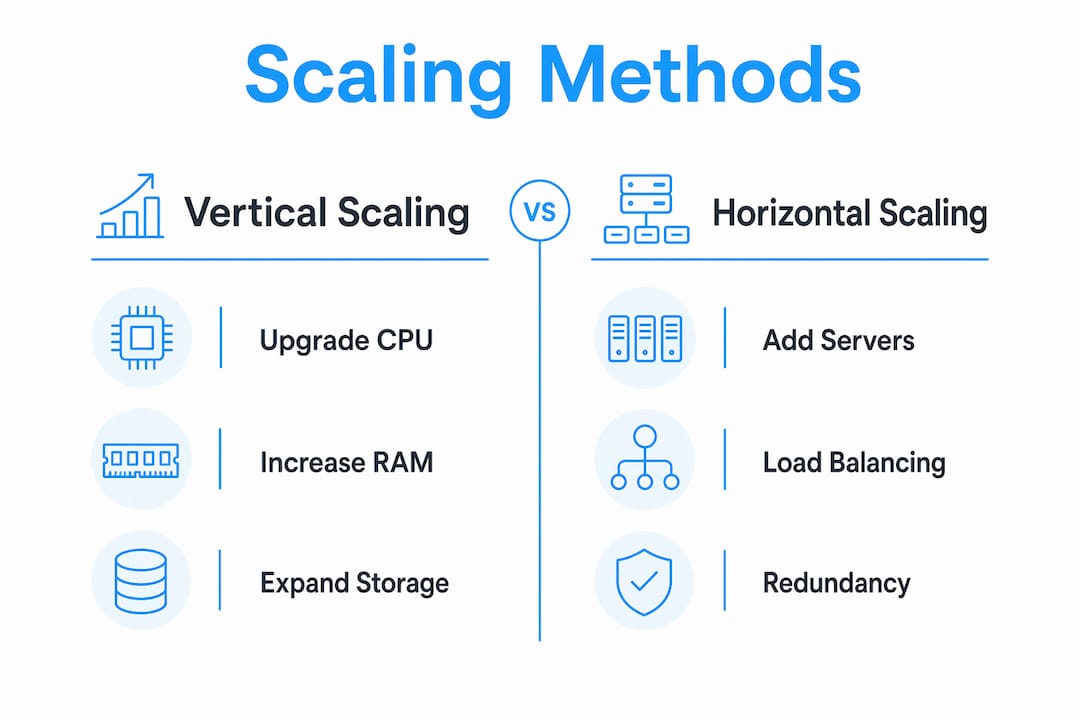
Vertical scaling is simpler to implement and requires no changes to your application code. Horizontal scaling has no inherent physical ceiling, but it requires your application to be designed for distributed, stateless operation. Most growing businesses start vertical and shift horizontal as traffic demands outgrow what a single machine can handle.
Pro Tip: Before committing to horizontal scaling, check whether your current server is actually hitting its CPU or memory ceiling. Many sites benefit from a simple vertical upgrade first, which buys time to redesign the application properly.
How to Achieve Seamless Vertical Scaling Without Downtime
Traditional vertical scaling required a server restart whenever you increased RAM or vCPU allocations. However, modern managed cloud platforms utilize hot-swapping cloud resources or live container migration to prevent service interruptions.
- Cloudways (Flexible Server Resizing): Allows 1-click vertical scaling of server RAM and NVMe storage via their dashboard. Scaling up takes under 3 minutes with minimal disruption, though scaling down requires spinning up a new instance.
- Kinsta & WP Engine (Containerized Auto-Scaling): Use Google Cloud Platform / AWS Google Kubernetes Engine containers. When PHP workers or RAM limits are hit during traffic spikes, isolated compute resources auto-scale instantly behind load balancers with zero downtime.
Load balancing, caching, and data-layer scaling
Autoscaling adjusts capacity during traffic spikes and scales back down afterward, maintaining responsiveness while controlling cost. Load balancers sit in front of your server pool and route each incoming request to the most appropriate instance using algorithms like round-robin, least connections, or consistent hashing.
CDNs like Cloudflare and Amazon CloudFront cache static files at edge locations worldwide, so images, CSS, and JavaScript are served from a server near your visitor rather than your origin. This alone can cut origin server load by 60 to 80 percent on content-heavy sites. At the database layer, read replicas handle query volume by duplicating your primary database for read operations, while sharding splits data across multiple databases to distribute write load.
Instant Scaling Hack: Edge Caching & Enterprise CDNs
Before upgrading your origin server’s hardware, offload up to 80% of dynamic and static requests at the edge. Managed providers like Kinsta (built-in Cloudflare Enterprise integration) and Hostinger Pro (global CDN & object caching) automatically absorb massive traffic surges at no extra bandwidth cost.
Why architecture design determines your scaling success
Scalability in cloud hosting is not just about the hosting provider you choose. It is about how your application is built. Stateless app design is the foundational requirement for effective horizontal scaling: any server replica must be able to handle any incoming request without needing to know what happened in a previous request.
Pro Tip: Why Horizontal Scaling for WordPress is Complex
Unlike stateless web apps, WordPress stores stateful data in two places: dynamic database records (MySQL/MariaDB) and file uploads (/wp-content/uploads/).To scale WordPress horizontally across multiple nodes:
- Offload Media: Move all images and media assets to S3/Cloudfront or Google Cloud Storage.
- Centralize Caching: Use an external Redis or Memcached cluster for session handling and database query caching.
- Database Replication: Implement a primary-replica MySQL setup or switch to Amazon Aurora Serverless.
The problem most growing sites run into is that their application stores session data locally on the server. When a load balancer routes a returning visitor to a different server instance, that session data is gone, and the user gets logged out or loses their cart. This is the sticky session problem, and it is one of the most common scaling bottlenecks.
The fix is to externalize session storage to a dedicated tool like Redis or Memcached. Instead of storing session data on the web server, every instance reads and writes session data to a shared, fast in-memory store. Media files follow the same logic: store them in an object storage service like Amazon S3 rather than on the local server filesystem, so every instance can access the same files.
- Session data: Move to Redis or Memcached for shared, fast access across all instances
- Media files: Store in Amazon S3, Google Cloud Storage, or similar object stores
- Application state: Design every request to be self-contained, carrying all needed context
- Database connections: Use connection pooling tools like PgBouncer to prevent connection exhaustion under load
Pantheon’s WordPress scaling guide specifically lists stateless session handling, object storage, and database read replicas as the three pillars of scaling a WordPress site beyond a single server. WordPress is a useful example because it is stateful by default, and scaling it requires deliberate architectural changes rather than just clicking “upgrade” in a hosting dashboard.
Pro Tip: If you are using a managed WordPress host, ask specifically whether session data is stored locally or in an external cache. Hosts that use Redis object caching by default save you significant re-architecture work later.
How scalable hosting manages traffic spikes and stays reliable
Traffic spikes degrade performance faster than infrastructure reacts when scaling relies on static thresholds. Modern scalable hosting solutions base scaling decisions on real traffic behavior, not fixed CPU percentages set months ago.
Here is how a well-configured scalable hosting environment handles a sudden surge:
- Monitoring detects the spike. Metrics like CPU utilization, request latency, and active connection count cross a defined threshold. AWS Auto Scaling Groups, for example, use CPU utilization and request latency as primary triggers.
- A scale-out policy fires. New server instances launch automatically, joining the load balancer pool within seconds to minutes depending on the provider and configuration.
- The load balancer distributes traffic. Incoming requests spread across all healthy instances using the configured algorithm. Least-connections routing works well during spikes because it prevents any single instance from becoming overwhelmed.
- Health checks run continuously. Active pings and passive monitoring confirm each instance is responding correctly. Any instance that fails health checks is removed from rotation, with in-flight requests completed before removal through a process called graceful drain.
- A cooldown period prevents oscillation. After scaling out, the system waits a defined period before evaluating whether to scale again. Without this, a brief CPU spike can trigger repeated scale-out events, inflating costs unnecessarily.
- Traffic normalizes and the cluster scales back in. Once demand drops, excess instances are terminated, and you pay only for what you used.
Pro Tip: Set your scale-in cooldown period longer than your scale-out cooldown. Scaling out quickly protects user experience; scaling in slowly prevents you from terminating instances that are still needed during a gradual traffic decline.
The key insight here is that removing serialization bottlenecks matters more than raw instance count. If your database becomes the bottleneck during a spike, adding more web servers does nothing. Web hosting performance optimization requires identifying where the constraint actually lives before throwing more compute at the problem.
What are the real benefits of scalable web hosting?
The practical benefits of hosting scalability extend well beyond “your site won’t crash.” Here is what scalable infrastructure actually delivers for growing businesses:
- Cost efficiency through elastic resource use. You pay for capacity when you need it and release it when you don’t. This avoids the overprovisioning trap where you pay for a large dedicated server 24 hours a day to handle a traffic spike that lasts two hours.
- Stable page load times under variable load. Response time consistency directly affects conversion rates. A site that loads in 2 seconds during normal traffic but 8 seconds during a sale loses customers at the exact moment they are most likely to buy.
- Built-in redundancy. Horizontal scaling distributes your application across multiple instances and often multiple availability zones. A single server failure does not take your site offline.
- Geographic expansion without re-architecture. Cloud providers like AWS, Google Cloud, and Microsoft Azure let you deploy instances in multiple regions and serve traffic from the closest one. Combined with edge caching, this reduces latency for international visitors without rebuilding your infrastructure.
- Predictable growth planning. Web hosting capacity planning becomes far simpler when your infrastructure scales with demand. You set thresholds and policies once, then let the system respond automatically rather than manually upgrading servers every time traffic grows.
Understanding the benefits of hosting scalability also means recognizing what you avoid: emergency server upgrades during a traffic event, downtime during peak sales periods, and the reputational cost of a slow or unavailable site. For e-commerce businesses especially, uptime and speed are directly tied to revenue.
What I’ve learned about scalability that most guides skip
Most articles on web hosting scalability focus on the technology stack and stop there. After working through real scaling challenges, the lesson that sticks is this: scalability is a design property, not a feature you bolt on later. You cannot take an application built with local session storage, a single monolithic database, and hardcoded file paths, then expect it to scale horizontally just because you moved it to a cloud provider.
The most common mistake I see is businesses rushing to shard their database the moment they hit performance problems. Database sharding is complex, introduces coordination overhead, and is almost never the right first step. Before sharding, check whether you have proper indexes, whether read replicas can absorb your query volume, and whether caching eliminates repetitive database calls entirely. Most sites can handle far more traffic than they think with a well-configured Redis cache and a read replica, without touching the database schema at all.
Sticky sessions are the other silent killer. They feel harmless in development but become a hard ceiling on horizontal scaling in production. If you are evaluating hosting providers and scalability matters to your growth plan, ask them directly how they handle session persistence. The answer tells you a lot about how mature their architecture is. Avoid common hosting mistakes like assuming your current setup will scale just because it runs on a cloud platform.
— Stefan
Recommended Managed Hosts by Scaling Need
- Need Instant 1-Click Vertical Scaling?
Cloudways Cloud Hosting ↗ allows you to scale vCPU, RAM, and NVMe storage seamlessly on DigitalOcean, Linode, or AWS infrastructure as your client base expands.
Start 3-Day Free Cloudways Trial → - Need Automated Enterprise Auto-Scaling (Horizontal)?
WP Engine Managed Hosting ↗ automatically handles traffic spikes with isolated, containerized architecture without needing custom load balancers.
Get WP Engine Managed Hosting →
Find a hosting provider built for your growth
If you are planning for growth and want hosting that actually scales with your site, the provider you choose matters as much as the architecture you build. Digi Host Guide has reviewed and compared the top hosting providers based on real performance data, scalability features, and pricing transparency. Whether you are running a small business site that needs room to grow or an e-commerce store preparing for seasonal traffic, the hosting reviews at Digi Host Guide give you a clear picture of which providers deliver on their scalability promises.
What is web hosting scalability in simple terms?
Web hosting scalability is the ability of your hosting infrastructure to add or reduce resources automatically as traffic changes, keeping your site fast and available without manual intervention.
What is the difference between vertical and horizontal scaling?
Vertical scaling upgrades a single server’s hardware, while horizontal scaling adds more server instances behind a load balancer. Horizontal scaling has no physical ceiling but requires stateless application design.
Do I need scalable hosting if my site is small?
Not immediately, but choosing a host with scalability options from the start means you won’t need to migrate your entire site when traffic grows. Cloud-based and VPS hosting plans typically offer the easiest path to scaling up.
What is autoscaling in cloud hosting?
Autoscaling is a feature that automatically adjusts the number of active server instances based on live metrics like CPU usage or request latency, scaling out during spikes and scaling back in when demand drops.
Why do sticky sessions cause scaling problems?
Sticky sessions tie a user’s requests to a specific server instance, which prevents the load balancer from distributing traffic freely. Session state externalization using tools like Redis solves this by storing session data centrally so any server instance can handle any request.

