

Last Updated on: 26th May 2026, 12:49 pm
TL;DR:
- Free hosting offers limited resources, subdomains, and no guarantees, suitable mainly for learning or testing.
- Paid hosting provides reliable uptime, custom domains, security, and scalability essential for professional websites.
When you’re starting a website, one of the first decisions you’ll face is choosing between paid and free web hosting. It seems simple at first. Free sounds great, right? But this paid vs free web hosting comparison is more nuanced than most beginners expect. The hosting you choose affects your site’s speed, reliability, branding, and long-term growth. Getting it wrong early can cost you more time and effort than the money you saved. This guide walks you through the real differences, the trade-offs, and how to pick what actually fits your situation.
Table of Contents
- Paid vs free web hosting: what’s the real difference?
- The real pros and cons of free hosting
- The real pros and cons of paid hosting
- Side-by-side comparison: free vs paid hosting
- How to choose the right hosting for your situation
- My honest take after watching many hosting decisions go wrong
- Find your ideal hosting plan with Digi Host Guide
- FAQ
Paid vs free web hosting: what’s the real difference?
Web hosting is the service that stores your website’s files on a server and makes them accessible to anyone on the internet. Think of it as renting space on a computer that’s always switched on. Without it, your site simply doesn’t exist online.
The core difference between free and paid hosting comes down to resources, control, and accountability. Free hosting gives you server space at no cost, but you’re working within tight limits set by the provider. Paid hosting means you’re paying for a defined level of performance, support, and features.
Here’s a quick breakdown of the main categories:
Paid hosting types:
- Shared hosting — Your site shares server resources with other websites. It’s the most affordable paid option, typically starting at $2 to $10 per month.
- VPS (Virtual Private Server) — You get a dedicated portion of a server’s resources. More control, better performance, usually $20 to $80 per month.
- Managed hosting — The provider handles technical maintenance, updates, and security. Ideal for WordPress users or business owners with no technical background.
- Cloud hosting — Your site runs across multiple servers, offering flexibility and scalability. Pricing is usually usage-based.
You can explore a full breakdown of these options in this guide to hosting service types.
Free hosting common limitations:
- Subdomains instead of custom domains (e.g., yoursite.provider.com)
- Forced third-party ads on your pages
- Limited storage, often under 1GB
- No guaranteed uptime or customer support
- Restricted bandwidth that throttles traffic spikes
Modern free hosting options like Cloudflare Pages have raised the bar for developers. The Cloudflare Pages free tier offers unlimited bandwidth and a global CDN, but it caps file sizes at 25MB and limits deployments to 20,000 files. That’s fine for a simple static site, but it won’t work for most dynamic websites.
The real pros and cons of free hosting
Free hosting has genuine uses. Don’t dismiss it entirely. But you need to go in with clear eyes about what you’re actually getting.
Where free hosting works well:
- Learning HTML, CSS, or web development basics
- Testing a concept or prototype before committing budget
- Short-term campaigns or temporary landing pages
- Personal hobby projects with no commercial intent
The zero-cost entry is real, and setup is usually fast. No billing, no contracts, no financial risk. For a student learning to code or someone testing a business idea, that matters.
Where free hosting falls short:
The problems start when you want your site to perform and grow. Free hosting often hides risks like deletion without notice, no backups, throttled resources, and SEO penalties from slow load times. These aren’t edge cases. They’re common experiences.
One of the biggest performance issues is the noisy neighbor
Speed matters more than most people realize. 53% of mobile users abandon a site that takes longer than 3 seconds to load, and free hosting regularly pushes sites past that threshold due to server overcrowding.
Then there’s the branding issue. Free hosting typically locks you into a subdomain. Visitors see “yoursite.freehost.com” instead of “yoursite.com.” That subdomain signals to search engines and visitors alike that this isn’t a serious operation. It directly hurts your SEO and your credibility.
Pro Tip: If you’re using a modern static host like Cloudflare Pages for a free project, watch your file count carefully. Exceeding the 20,000 file deployment limit causes errors that can be tricky to diagnose, especially for newer developers.
The real pros and cons of paid hosting
Paid hosting is not a luxury. For most websites with any serious purpose, it’s the baseline you need to operate professionally.

What paid hosting actually gives you:
The most meaningful paid hosting advantages are reliability and accountability. Paid hosting SLAs typically guarantee 99.9% uptime or higher, which translates to less than 9 hours of downtime per year. Free hosting offers no such guarantee. Your site could go down for days and you’d have no recourse.
Security is another major differentiator. Paid hosting includes automatic backups, DDoS protection, and managed security features that free plans simply don’t offer. For a business site handling customer data, this isn’t optional.
Custom domains are standard with paid plans. “yoursite.com” instead of a subdomain builds trust with visitors and search engines. You also get full control over metadata, redirects, and technical SEO settings that free hosting restricts or blocks entirely.
Paid hosting drawbacks to know:
Cost is the obvious one. Entry-level shared hosting starts around $2 to $10 per month, but renewal rates are often significantly higher than promotional prices. Add-ons like SSL certificates, domain registration, and email hosting can push costs up if you’re not careful about what’s included.
There’s also a common misconception worth addressing. 67% of website owners mistakenly believe managed hosting automatically handles all security and maintenance tasks. It doesn’t. Managed hosting covers infrastructure-level maintenance, not your application’s security or content updates. Understanding that boundary saves you from unpleasant surprises.
Choosing between plans can also feel overwhelming when you’re new to hosting. Dozens of providers, confusing tier names, and aggressive upselling make it hard to know what you actually need. This guide on choosing web hosting can help you cut through the noise.
Pro Tip: Always check the renewal price before signing up for a hosting plan. Introductory rates can be 60 to 80% lower than what you’ll pay after the first year. Factor that real cost into your decision.
Side-by-side comparison: free vs paid hosting
Here’s a direct web hosting pricing comparison across the criteria that actually matter when you’re starting a site.
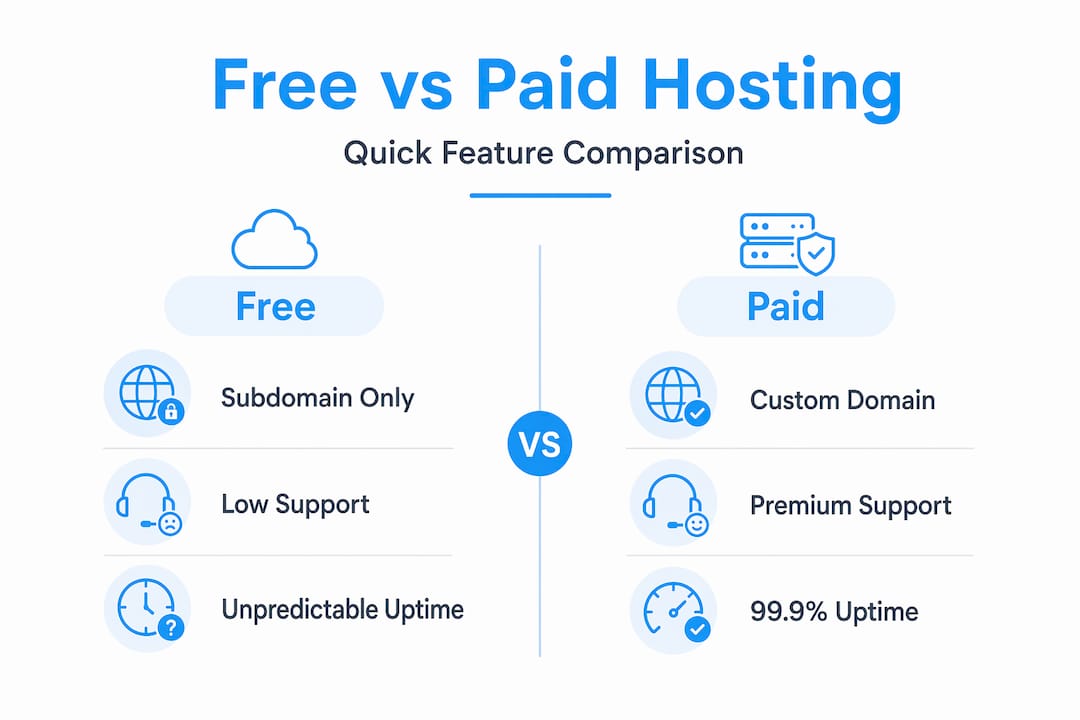
| Feature | Free Hosting | Paid Hosting |
|---|---|---|
| Cost | $0 upfront, hidden trade-offs | $2 to $100+/month depending on plan |
| Uptime guarantee | None | 99.9% SLA or higher |
| Custom domain | Subdomain only | Included or available to connect |
| Storage | Very limited (under 1GB typical) | 10GB to unlimited depending on plan |
| Bandwidth | Throttled or capped | Generous or unmetered |
| Ads on your site | Often forced | None |
| Security features | Minimal or none | SSL, DDoS protection, backups |
| Customer support | None or community forums | 24/7 live chat, phone, or tickets |
| SEO control | Very limited | Full control |
| Scalability | Minimal | Upgrade paths available |
The table makes the trade-offs clear, but context matters. Free hosting suits learning, prototypes, and short-term campaigns. Paid hosting is necessary for consistent uptime and any site you want people to take seriously.
A few additional points worth highlighting:
- SEO impact is real and often underestimated. Subdomains, forced ads, and slow speeds all signal lower quality to search engines.
- Data ownership differs significantly. Free hosts can delete your account without warning. Paid hosts provide data portability and backup tools.
- Modern free static hosts like Cloudflare Pages change the picture for frontend developers, but they don’t replace paid hosting for dynamic sites, databases, or e-commerce.
How to choose the right hosting for your situation
Knowing the differences is only half the job. You still need to match those differences to your actual needs. Here’s a practical framework to help you decide.
Define your website’s purpose. A personal blog, a business website, and an online store have very different requirements. A hobby blog can tolerate more limitations. A business site cannot afford downtime or an unprofessional subdomain.
Estimate your traffic expectations. If you’re just starting out with minimal visitors, a basic shared hosting plan is fine. If you expect rapid growth or traffic spikes, look at VPS or cloud options from the start. Migrating later is possible but adds friction.
Set a realistic budget. Good shared hosting starts at $2 to $5 per month. That’s genuinely affordable for most people. If budget is truly zero, use a modern free static host for now and plan to migrate. Don’t treat free hosting as a permanent solution for a site you care about.
Assess your technical comfort level. If you’re not comfortable managing server settings, look for managed hosting or providers with strong onboarding support. If you’re a developer comfortable with command-line tools, a VPS gives you more control at lower cost.
Think about security and compliance needs. If your site collects user data, processes payments, or operates in a regulated industry, you need paid hosting with proper security features and compliance support. Free hosting is not an option here.
Plan your migration path. If you start on a free host, choose one that lets you export your files and data easily. Moving from a static free host to a paid plan is manageable. Moving from a proprietary free platform with no export options is painful.
Test before committing long-term. Many paid hosts offer monthly billing or money-back guarantees. Use that window to test speed, support responsiveness, and control panel usability before locking into an annual plan.
For small business owners specifically, this small business hosting guide walks through the decision in more detail.
My honest take after watching many hosting decisions go wrong
I’ve seen a lot of people start websites on free hosting with the intention of “upgrading later when things take off.” In my experience, that upgrade almost never happens smoothly. By the time the site gains traction, the owner is dealing with a subdomain that’s been indexed by Google, content that’s hard to migrate, and a brand that visitors already associate with a less-than-professional address.
What I’ve learned is that the real cost of free hosting isn’t the money you save upfront. It’s the credibility you spend. A business website on a subdomain tells visitors something before they read a single word. And that first impression is hard to undo.
That said, I don’t think free hosting is always wrong. For developers building prototypes, students learning the ropes, or anyone testing a concept before investing, modern free static hosts are genuinely useful tools. The mistake is treating them as a long-term solution for a site with real goals.
My honest advice: if you’re serious about your website, even slightly, spend the $3 to $5 a month on entry-level shared hosting. The custom domain alone is worth it. The uptime guarantee, the support access, and the ability to grow without hitting arbitrary limits make the rest of the decision easy. Balancing cost and professionalism doesn’t require a big budget. It just requires being honest about what your site actually needs.
— Stefan
Find your ideal hosting plan with Digi Host Guide
Now that you understand the real differences between free and paid hosting, the next step is finding a provider that fits your specific needs and budget. Digi Host Guide has researched so you don’t have to start from scratch. You’ll find detailed hosting provider reviews that break down performance, pricing, support quality, and real-world reliability for each service. If you want a ranked list to start from, check out the curated top web hosting providers updated for 2025 and beyond. Whether you’re choosing your first plan or reconsidering your current one, these resources give you a clear, unbiased starting point.
FAQ
What is the main difference between free and paid hosting?
Free hosting provides server space at no cost but comes with significant limitations including subdomains, forced ads, no uptime guarantees, and minimal support. Paid hosting offers custom domains, reliable uptime SLAs, security features, and scalable resources in exchange for a monthly or annual fee.
Is free web hosting good enough for a business website?
No. Free hosting lacks the uptime guarantees, custom domain support, and security features that a business website requires. It is best suited for learning, testing, or short-term personal projects rather than professional or commercial use.
How much does paid web hosting typically cost?
Entry-level shared hosting starts at around $2 to $10 per month. VPS hosting ranges from $20 to $80 per month, while managed and cloud hosting can cost more depending on usage and features. Always check renewal rates, as introductory prices are often significantly lower.
Can I start on free hosting and move to paid later?
Yes, but plan carefully. Choose a free host that allows easy file and data export. Migrating from a subdomain to a custom domain also means rebuilding your SEO presence, so the sooner you move to a paid plan, the less rework you’ll face.
Does paid hosting automatically handle all my website security?
Not entirely. As many website owners misunderstand, managed hosting covers infrastructure-level security like server maintenance and DDoS protection. Application-level security, such as keeping your CMS plugins updated and managing user permissions, remains your responsibility.

