

Last Updated on: 17th May 2026, 07:24 pm
What it does affect is something arguably more important: how fast your site loads for real users, and how that experience shapes your search visibility over time. Understanding this distinction can save you time, money, and a lot of unnecessary stress.
Table of Contents
- Understanding hosting location: What actually matters?
- How hosting location affects website speed and user experience
- Does server location really impact SEO?
- Making the right hosting choice for your audience
- A practical perspective: Why small business owners shouldn’t stress about server geography
- Find the right web hosting for your needs
- Frequently asked questions
Key Takeaways
| Point | Details |
|---|---|
| Server location impacts speed | Placing your server near your core audience reduces latency and improves load times. |
| SEO effect is indirect | Server location doesn’t drive country SEO targeting but influences rankings via performance. |
| Use a CDN for reach | A CDN helps deliver faster content globally, regardless of server origin. |
| Plan hosting changes carefully | Moving your hosting location might slow Google crawling temporarily, so monitor site health after changes. |
Understanding hosting location: What actually matters?
Hosting location refers to the physical place where your website’s data lives. Specifically, it’s the data center where your hosting provider stores your server. That might be in Dallas, Frankfurt, Singapore, or anywhere else a provider has infrastructure. When a user visits your site, their browser sends a request to that data center, which then sends back your web pages.
Here’s where the misconception starts. Many people believe that hosting your site in, say, the United Kingdom automatically helps you rank higher in UK search results. Don’t be fooled by this idea. As John Mueller of Google Search Central has made clear, server location is not used for geotargeting in search results. Google relies on other signals entirely for that purpose, including your domain’s top-level domain (TLD), your hreflang settings, your content language, and your Search Console geotargeting settings.
What hosting location genuinely affects is:
- Latency: The delay between a user’s request and the server’s response, measured in milliseconds
- Time To First Byte (TTFB): How quickly the first piece of your page data reaches the user’s browser
- Overall load speed: How fast your full page renders for visitors in different regions
- Perceived user experience: Whether your site feels snappy or sluggish to real people
Understanding the hosting and SEO impact relationship starts here. Speed and experience are the real stakes, not a geotargeting shortcut.
How hosting location affects website speed and user experience
Server geography has a direct and measurable effect on how fast your website loads. Think of it this way: data travels at high speed, but distance still adds up. A user in Sydney accessing a server in New York is sending a request roughly 16,000 kilometers away. That round trip adds real milliseconds to every page load.

When it comes to geographic location and hosting larger geographic moves can make pages load slower, affecting page experience according to Google’s own guidance. For small businesses and freelancers, this matters because slow pages lose visitors. Research consistently shows that users abandon sites that take more than a few seconds to load, and that behavior directly influences your bounce rate and engagement metrics.
Time To First Byte (TTFB) is the metric to watch here. TTFB measures how long it takes for a browser to receive the very first byte of data from your server. A high TTFB, often caused by physical distance between server and user, signals a sluggish connection before the page even begins to render.
Here’s a simplified look at how distance can affect average TTFB:
| Server location | User location | Approximate TTFB |
|---|---|---|
| New York | New York | 50 to 100 ms |
| New York | London | 150 to 250 ms |
| New York | Sydney | 300 to 450 ms |
| London | London | 40 to 90 ms |
| London | Sydney | 280 to 400 ms |
| Singapore | Singapore | 30 to 80 ms |
| Singapore | New York | 250 to 380 ms |
These are approximate ranges, but the pattern is clear. The farther your users are from your server, the longer they wait. For a local business serving one city or region, this is easy to solve: pick a data center close to your customers. For a freelancer with global clients, the answer is a bit more nuanced.
Pro Tip: Use a Content Delivery Network (CDN) to serve static assets like images, CSS, and JavaScript files from servers closer to your users. A CDN does not move your origin server, but it caches your content at edge locations worldwide, dramatically reducing load times for distant visitors.
When choosing a hosting provider, always check which data center locations are available and whether the provider includes CDN support or integrates easily with services like Cloudflare.
Does server location really impact SEO?
This is the question that causes the most confusion. The short answer: server location has no direct SEO impact, but it has a meaningful indirect one.
Google’s guidance is clear that server location is not used for geotargeting. If you want your site to appear in French search results, you need hreflang tags, French-language content, and ideally a .fr domain or a Search Console geotargeting setting. Moving your server to Paris will not accomplish that goal on its own.
What server location does influence is your site’s performance, and performance is a confirmed Google ranking factor. Specifically, Google’s Core Web Vitals include metrics like Largest Contentful Paint (LCP), which measures how quickly the main content of a page loads. A server far from your users will naturally produce worse LCP scores, which can drag down your rankings over time.
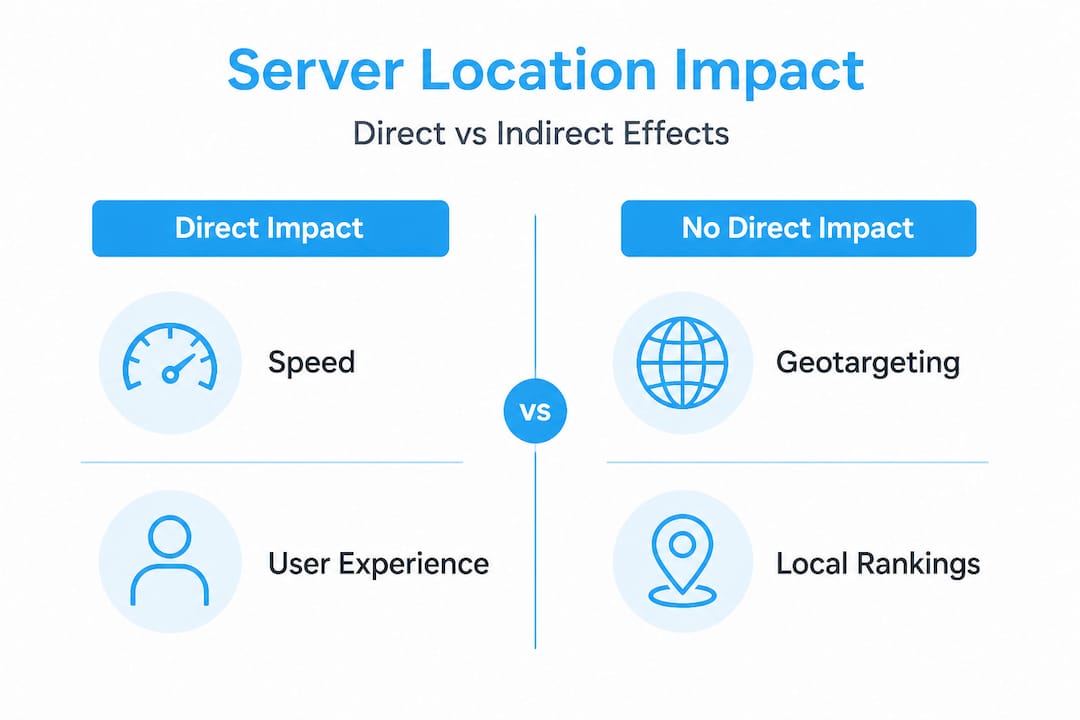
Here’s a clear comparison to keep in mind:
| Factor | Directly affected by server location? | Notes |
|---|---|---|
| Geotargeting in search results | No | Use TLD, hreflang, and Search Console instead |
| TTFB and load speed | Yes | Physical distance increases latency |
| Core Web Vitals (LCP) | Indirectly | Slower TTFB leads to worse LCP scores |
| Crawl frequency | Slightly | Google may crawl slower if server is distant |
| Overall search rankings | Indirectly | Via page experience signals |
The SEO takeaway for small businesses is to focus on page experience metrics like TTFB and LCP, and use a CDN for static assets, rather than worrying about picking a server in a specific country for ranking purposes.
You can use free SEO tools to monitor your Core Web Vitals and identify where performance is lagging by geography. If you notice a specific region showing poor scores, that’s a signal to investigate your CDN coverage or consider a closer server location for that audience.
Pro Tip: Set up Google Search Console and check your Core Web Vitals report regularly. Filter by page and device type to spot patterns. If mobile users in a specific region are seeing poor LCP scores, your hosting setup may be contributing to the problem.
Understanding hosting’s impact on rankings in this nuanced way helps you make smarter decisions without chasing myths.
Making the right hosting choice for your audience
Now that you know what actually matters, here’s how to make a practical decision about your hosting location.
- Identify where your core users are. Use Google Analytics or Search Console to find which countries and cities send you the most traffic. That’s your primary audience, and their experience should drive your server choice.
- Match your server region to your audience. If 80% of your visitors are in the US, a US-based server makes sense. If you serve clients across Europe, a central European data center in Germany or the Netherlands is a solid choice.
- Evaluate provider reliability and infrastructure. A server physically close to your users is only useful if the hosting provider maintains strong uptime and fast network speeds. Always check uptime guarantees and read performance reviews before committing.
- Add a CDN for secondary audiences. If you have meaningful traffic from a secondary region, a CDN is far more cost-effective than spinning up a second server. Most major hosts support easy CDN integration.
- Plan your migration carefully if switching. If you move your site to a server in a different country, expect temporary crawling effects as Google adapts to your new location. This is normal and usually resolves within a few weeks, but it’s worth knowing in advance so you don’t panic over a short-term dip.
Before finalizing any decision, review the key hosting considerations that go beyond location, including storage, bandwidth, support quality, and scalability.
Pro Tip: Before committing to a new host or server region, use a free tool like Pingdom or GTmetrix to test your site’s load time from multiple geographic locations. This gives you real data to compare, not just marketing promises from the provider.
A practical perspective: Why small business owners shouldn’t stress about server geography
Here’s an honest take from our experience watching businesses navigate hosting decisions: geographic location and hosting is one of the most overanalyzed topics in the entire process.
People spend hours debating whether to pick a US East or US West server, or whether a European server will hurt their Australian traffic. In most cases, that energy is better spent elsewhere. A well-configured CDN, a clean codebase, and optimized images will do far more for your site’s performance than obsessing over which data center your files sit in.
The SEO focus for freelancers should be on page experience and CDN usage, not server geography. That’s not just Google’s guidance; it reflects what we see in practice. Sites with mediocre hosting locations but excellent performance optimization consistently outperform sites with “perfectly located” servers that are bloated and slow.
If your audience is global, a CDN is not optional. It’s the single most effective infrastructure decision you can make for performance. If your audience is local, pick the nearest major data center and move on. Spend the rest of your time creating useful content, improving your site’s usability, and building the kind of experience that keeps people coming back.
For more practical guidance on all things hosting, explore the web hosting insights on our blog, where we cover everything from server types to performance optimization in plain language.
Find the right web hosting for your needs
Understanding hosting location is just one piece of the puzzle. Choosing the right provider, plan, and configuration matters just as much. At DigiHost Guide, we publish detailed hosting reviews that break down real-world performance, pricing, and features so you can compare options side by side. If you want a curated shortlist, our rankings of top web hosting providers highlight the best options for different use cases, from personal blogs to growing e-commerce stores. And if you’re still figuring out the basics, our guide on how to learn to choose a host walks you through every key decision in a clear, step-by-step format.
Frequently asked questions
Does my website have to be hosted in the same country as my main audience?
No, but hosting closer to your audience usually improves speed and user experience. Hosting location affects load time, not SEO targeting, so prioritize performance over geography when making this decision.
Will moving my website to another country affect my Google rankings?
Not directly, but moving your server may lead to temporary crawling slowdowns as Google processes your new location. Rankings typically stabilize within a few weeks once the transition settles.
What is the best hosting location for a global audience?
For global reach, choose a reliable host with a strong network and activate a CDN to serve all regions quickly. Focusing on page experience and using a CDN for static assets is more effective than trying to find one perfectly central server location.
How do I check if my server’s location is slowing down my website?
Test your site’s speed from multiple user locations using tools like GTmetrix or Pingdom, paying close attention to TTFB and overall load time scores. Consistent slowness from specific regions points directly to a distance or CDN coverage issue.
